
H3 Image vs MAI-Image-2.6: 6 Side-by-Side Tests, Specs and Pricing
Six side-by-side tests: MAI-Image-2.6 wins on editing and photoreal polish, while H3 Image leads on native 4K, 16 references, Chinese text, and open weights.
Read the verdict
MiniMax H3 Image and Microsoft's MAI-Image-2.6 are two of the newest image models of 2026, and they were built with very different goals. H3 Image is an open-weight model that renders native 4K files and accepts up to sixteen reference images. MAI-Image-2.6 is a closed Microsoft model that launched near the top of public leaderboards, with particular strength in editing, plus web grounding for current information.
This guide compares them on the things that change your results and your bill: output size, references, editing, text, speed, and cost. We ran the same six briefs on both models, one output each, with no cherry-picking, and we show every result side by side. For 12 more scored H3 Image samples, see our H3 Image review.
Quick verdict
Bottom line from our tests: MAI-Image-2.6 won four of our six briefs, H3 Image won one, and one was a draw. MAI-Image-2.6 is the safer pick for faithful edits and clean, photoreal product and portrait shots. H3 Image is the better fit for large native-resolution files, jobs with many reference images, simplified Chinese text, and teams that want open weights or no subscription.
Pick H3 Image when you need large, print-ready files (up to 4096 × 4096), more than five references in one job, accurate simplified Chinese text, open weights you can host yourself, or one-time credit packs with no subscription.
Pick MAI-Image-2.6 when your main work is precise editing of existing images, clean photoreal product and portrait shots, or visuals that use current web information, especially if your team already builds on Microsoft Azure.
Test both if you're unsure. MAI-Image-2.6 can be tried in Microsoft's MAI Playground, and you can open the H3 Image studio in your browser.
At a glance: H3 Image vs MAI-Image-2.6
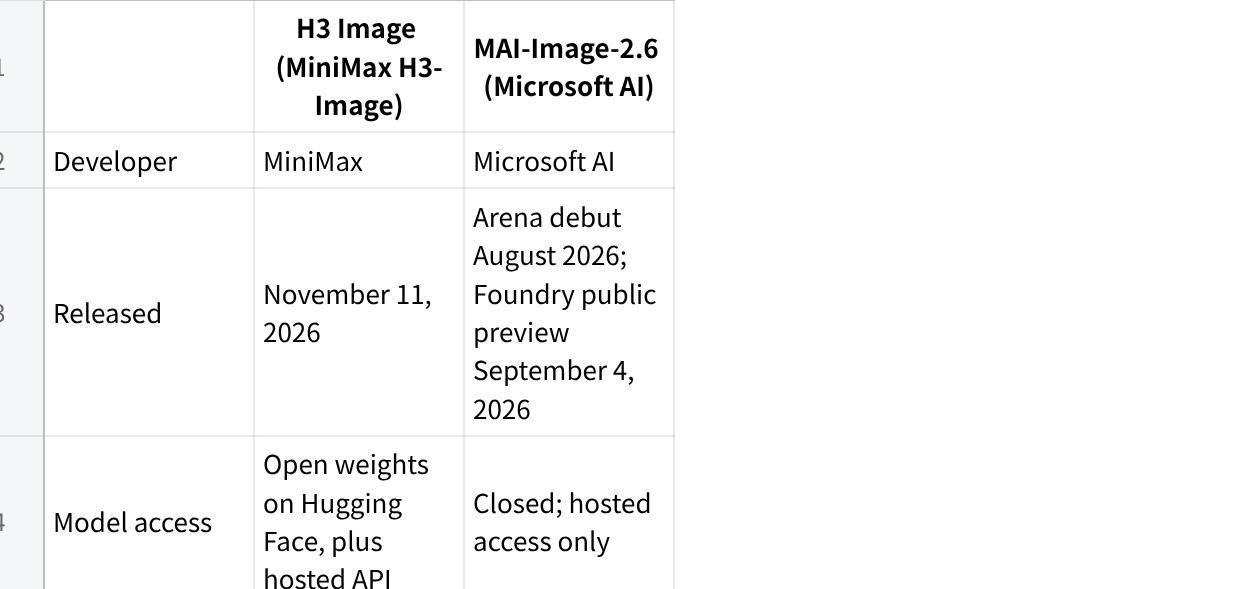
| H3 Image (MiniMax H3-Image) | MAI-Image-2.6 (Microsoft AI) | |
|---|---|---|
| Developer | MiniMax | Microsoft AI |
| Released | November 11, 2026 | Arena debut August 2026; Foundry public preview September 4, 2026 |
| Model access | Open weights on Hugging Face, plus hosted API | Closed; hosted access only |
| Maximum output | Native 4K, 4096 × 4096 (about 16.8 MP) | Up to 1.5K per Microsoft, about 1536 × 1536 (about 2.4 MP); our test platform returned 2048 × 2048 |
| Reference images | Up to 16 | Up to 5 for multi-reference editing |
| Modes | Text-to-image, reference generation, editing in one model | Text-to-image, image editing, web grounding |
| Aspect ratios | 1:1, 16:9 and 9:16 in our studio | Fixed ratios, or let the model pick one (dynamic aspect ratio) |
| Speed claim | A 4K image in under 10 seconds (vendor claim) | A separate Flash version targets speed |
| Where to use it | h3imageai.net, MiniMax API, Hailuo AI, self-hosting | MAI Playground, Microsoft Foundry, API resellers |
| Pricing style | Credits on our site: 3 credits at 1K/2K, 8 at 4K | Token pricing on Foundry: $5/M text in, $8/M image in, $38/M image out |
点击图片可查看完整电子表格
Sources: MiniMax's H3-Image announcement, Microsoft AI's MAI-Image-2.6 announcement, the Microsoft Foundry blog, and OpenRouter's model listing. Vendor speed and ranking claims are the developers' own figures.
Meet the two models
MiniMax H3 Image
MiniMax released H3-Image on November 11, 2026. It is an open-weight image model built on H3, the company's multimodal video model launched at the end of July. One checkpoint handles text-to-image, reference-based generation, and image editing, so you don't switch models when a brief moves from "create" to "change."
MiniMax highlights three things. The model outputs native 4K at 4096 × 4096. It claims a full 4K image in under ten seconds. It accepts up to sixteen reference images, and MiniMax says it has state-of-the-art prompt adherence among open-weight models. The weights are on Hugging Face (the BF16 checkpoint is roughly 69 GB), and the model is also hosted through the MiniMax API, MiniMax Code, and Hailuo AI.
Microsoft MAI-Image-2.6
MAI-Image-2.6 comes from Mustafa Suleyman's Microsoft AI group. It is a diffusion-based model for text-to-image and image-to-image work. Microsoft announced it in August 2026 at No. 2 on the Arena text-to-image leaderboard. On September 4 it opened to developers in Microsoft Foundry as a public preview, alongside a faster, cheaper MAI-Image-2.6-Flash.
Its headline features are multi-reference editing, web grounding (pulling current information from the web into a visual), and dynamic aspect ratios. At the Foundry launch, Microsoft reported it at No. 2 for text-to-image and No. 1 for image editing on Artificial Analysis. Output tops out around 1.5K.
One timing note: on October 27, 2026, Microsoft previewed MAI-Image-2.7, an editing-first successor. As of mid-November it has no public API or price, and MAI Playground still uses 2.6 for text-to-image. For developers, MAI-Image-2.6 remains the production model in the family.
Hands-on test: 6 identical briefs
Specs only tell half the story, so we gave both models the same six briefs. Each brief targets one claim from the spec sheet: skin realism, bilingual text, exact counts, editing, multiple references, and large-format detail.
Test setup
We scored every image from 1 to 10 on four points: prompt adherence, detail, text accuracy (where the brief has text), and how usable it is without fixes. We also logged generation time and cost per image. Images below are resized for the page. Where detail matters, we add a 100% crop.
Test 1: Portrait realism and skin texture
Prompt: "Close-up portrait of a 70-year-old fisherman on a harbor dock at golden hour, weathered skin, gray stubble, navy wool cap, natural light, shot on an 85mm lens, shallow depth of field."
What it tests: MiniMax says H3 Image avoids the overly smooth, plastic look of many AI images. Wrinkles, pores, stubble, and eye catchlights show whether either model fakes texture.
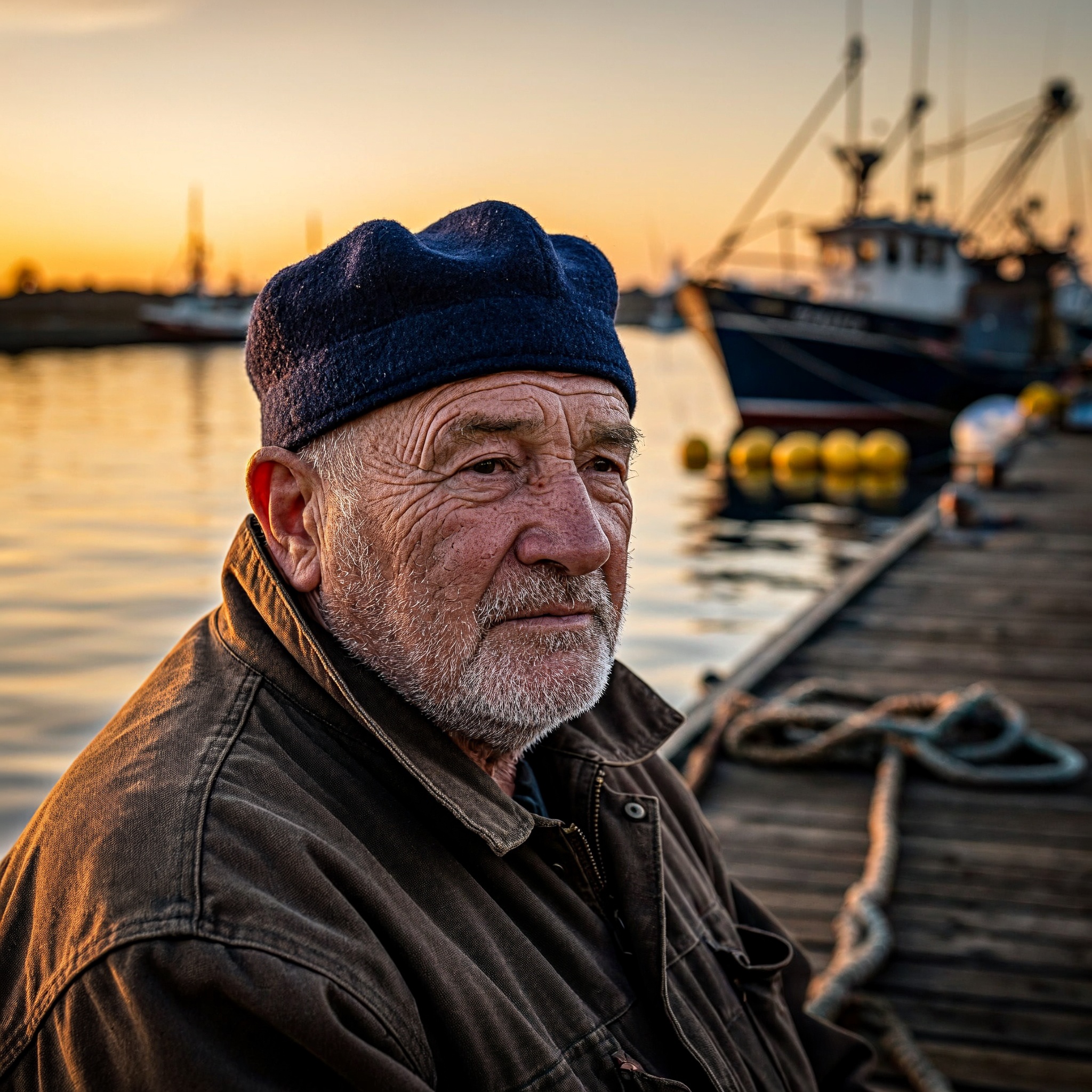
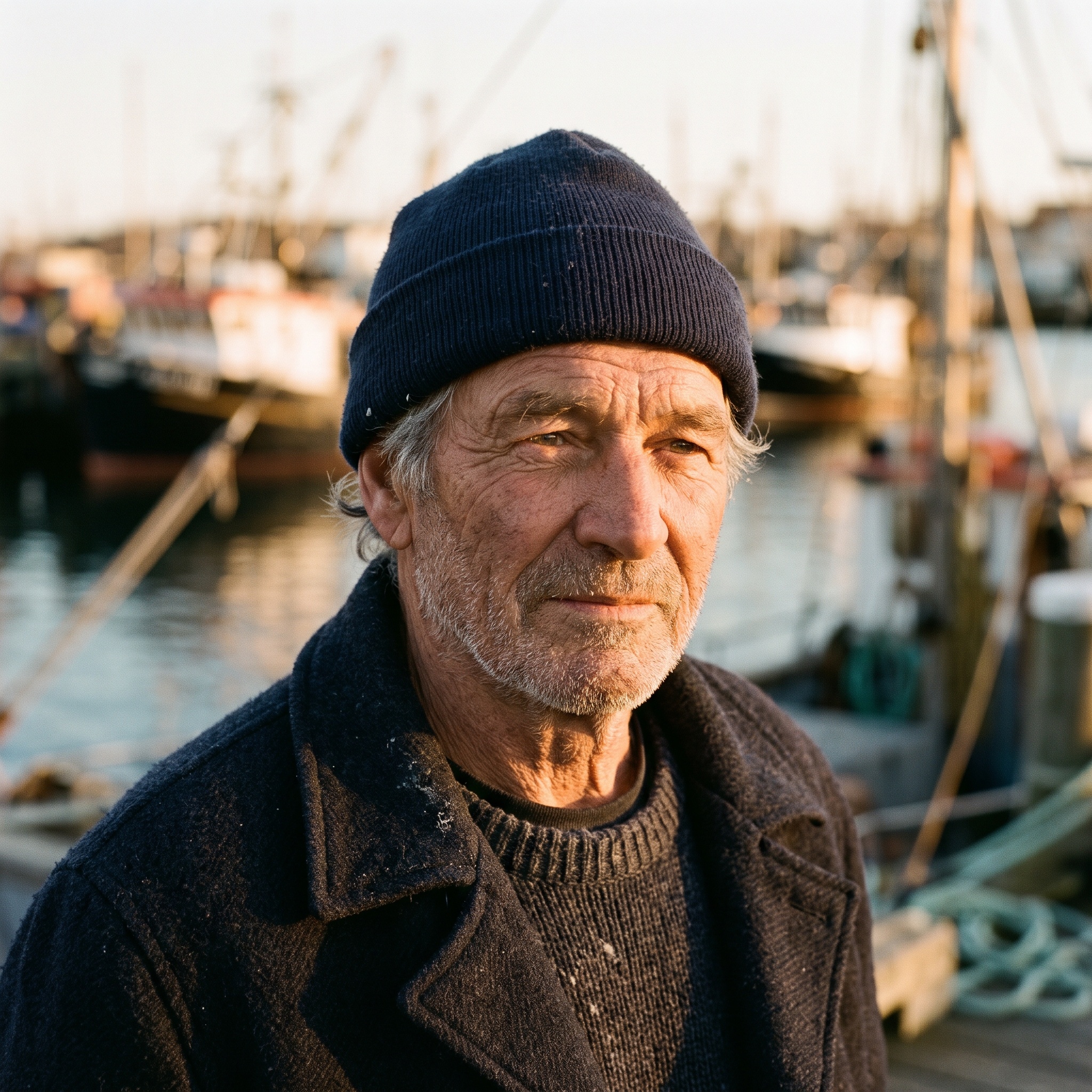
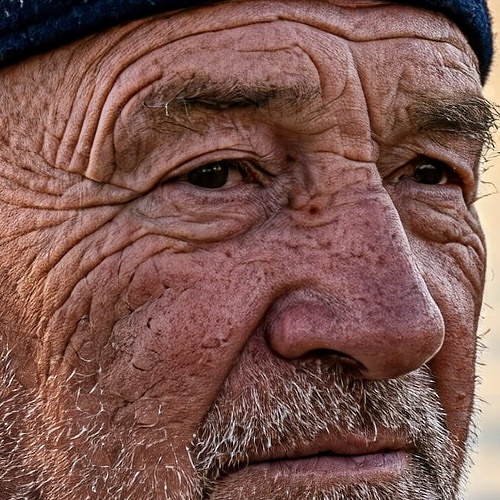
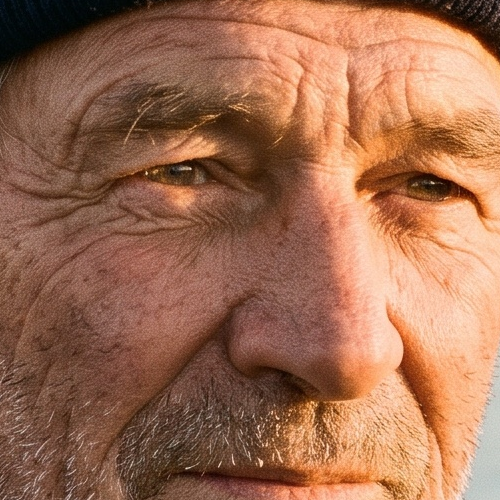
Result: MAI-Image-2.6 wins on realism. Both models followed the brief: an older fisherman with gray stubble, a navy wool cap, a harbor dock, and a shallow depth of field. H3 Image matched the scene more literally, with a full sunset sky and a trawler behind him. But its skin looks over-sharpened. At 100%, the wrinkles turn into a dense, cracked pattern, much like heavy HDR processing. MAI-Image-2.6's face reads like a real film photo, with natural pores, softer wrinkles, and clear catchlights in the eyes. Its sky is pale, so the golden-hour look comes mostly from the warm light on his face.
Test 2: Bilingual sign text
Prompt: "A small tea shop at dusk, a wooden sign above the door reading 'Moonleaf Tea' with the Chinese characters '月叶茶馆' below it, warm light inside, a bicycle parked by the door."
What it tests: MAI-Image-2.6 has the stronger public record on multilingual signs. MiniMax makes no text claims for H3 Image. We checked every letter and every character.
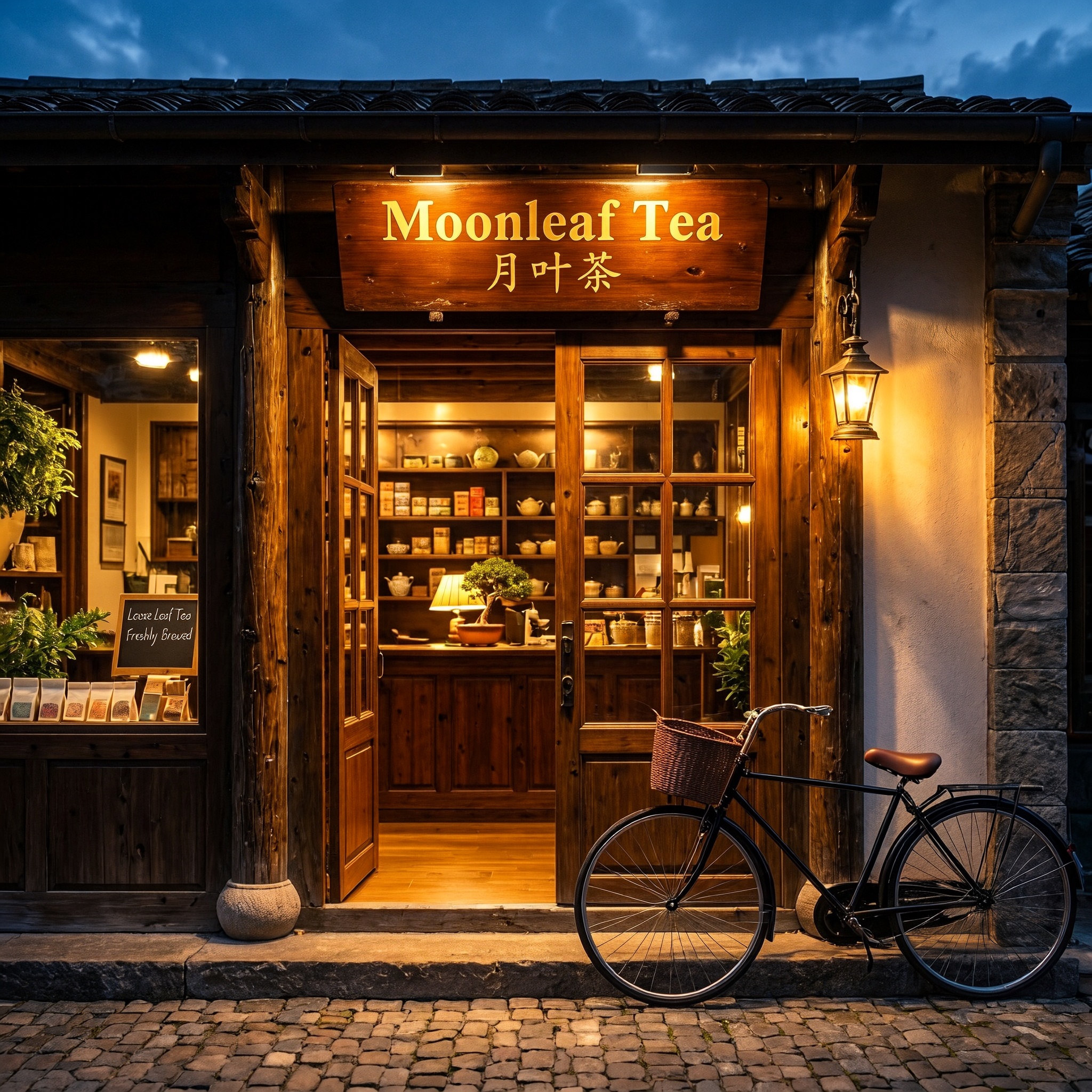
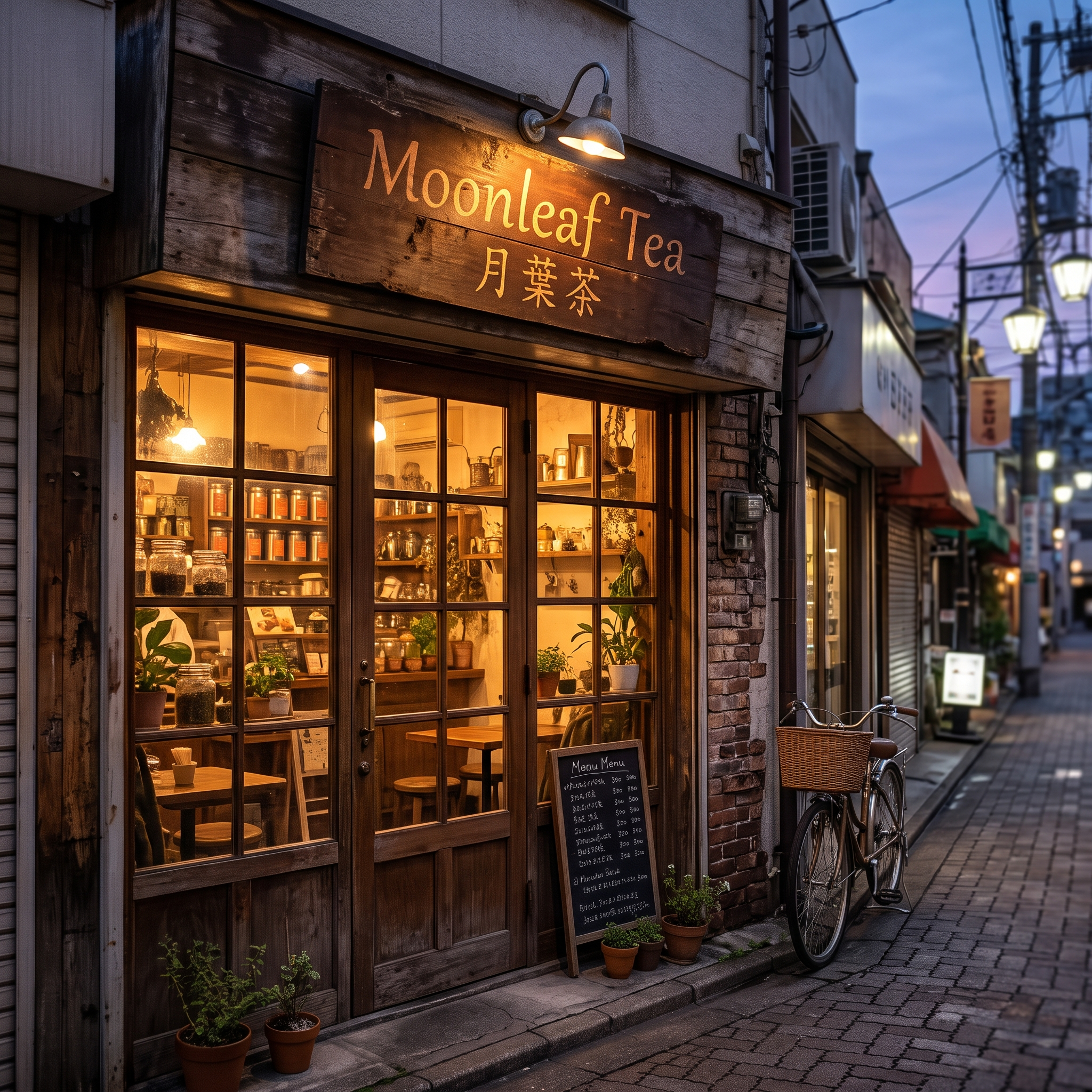
Result: H3 Image wins, but neither sign is fully correct. Both models spelled "Moonleaf Tea" correctly, and both dropped the fourth character, 馆. H3 Image wrote the other three characters as asked, in simplified Chinese (月叶茶). MAI-Image-2.6 switched 叶 to its traditional form 葉, so its Chinese line doesn't match the prompt. Both also added a chalkboard we didn't ask for. H3 Image's chalkboard has slightly misspelled words, while MAI-Image-2.6's menu is mostly unreadable. MAI-Image-2.6's street scene looks more natural, but this test is about text.
Test 3: Exact count and placement
Prompt: "Top-down photo of a white table with exactly three red mugs on the left side and exactly two blue plates on the right side. Nothing else on the table."
What it tests: Counting and left/right placement. Our H3 Image review found exact counts to be a weak spot, so this brief checks whether MAI-Image-2.6 does better.
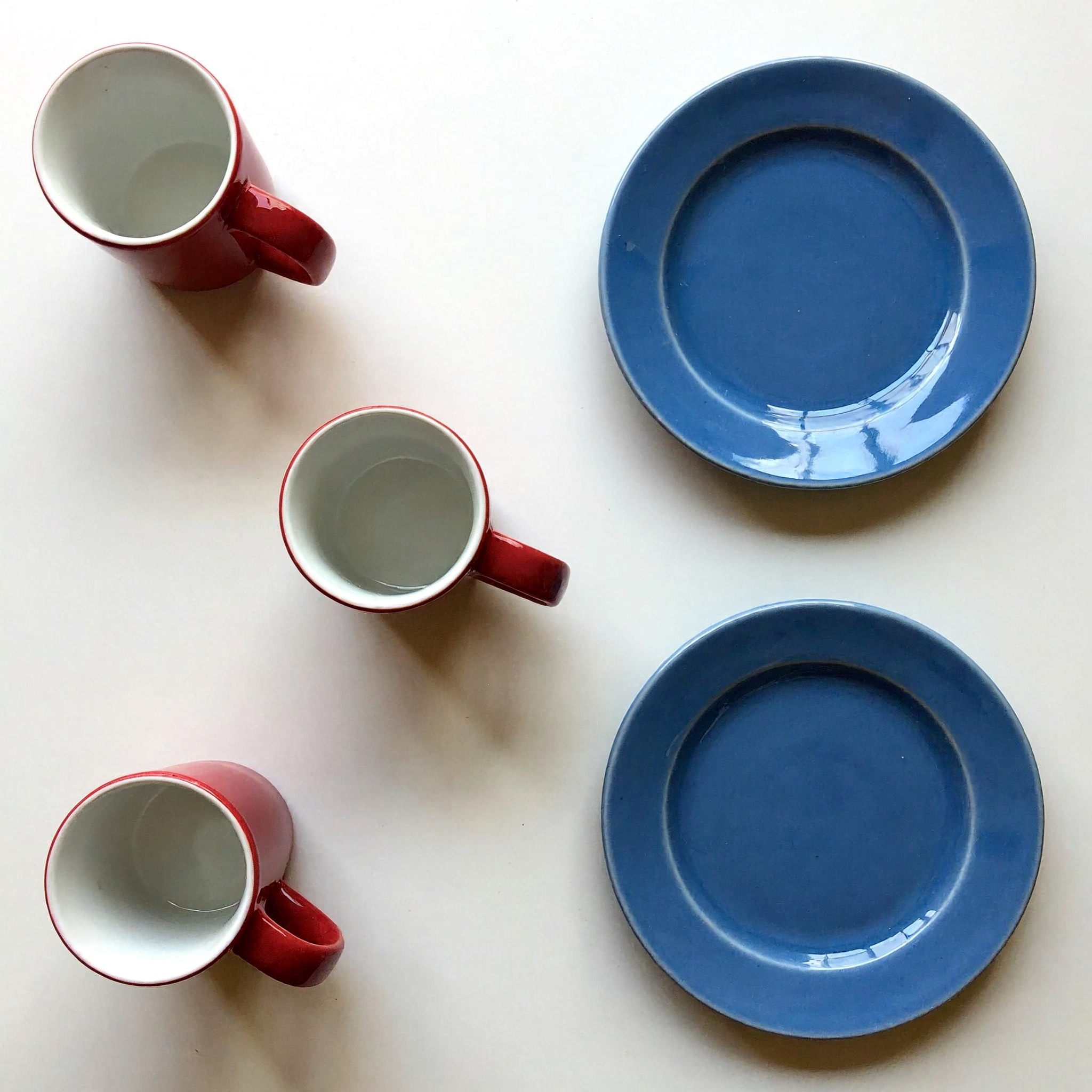
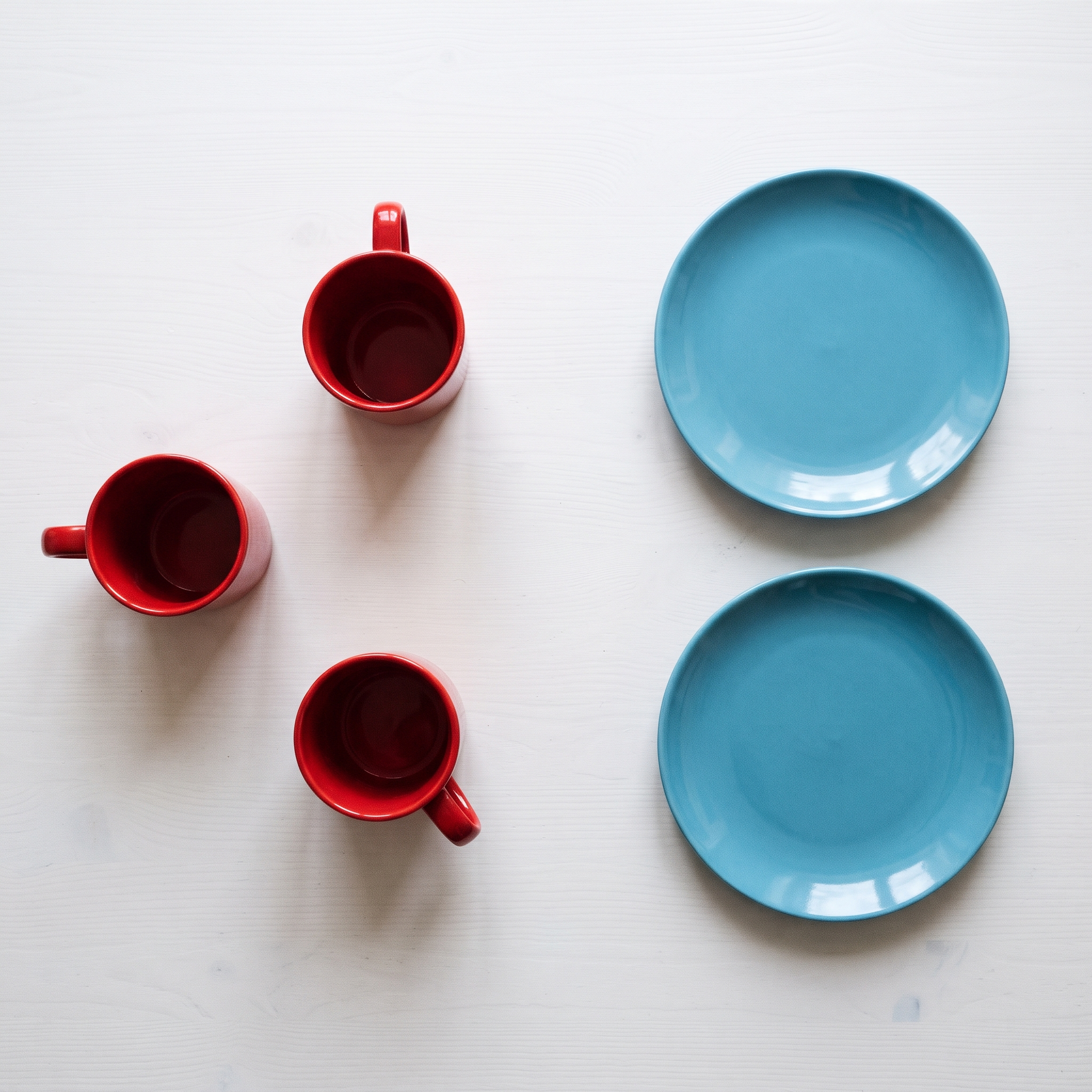
Result: both got the count right; MAI-Image-2.6 wins on clean geometry. Both images show exactly three red mugs on the left and two blue plates on the right, with nothing else on the table. That's a step up for H3 Image, which missed exact counts in our earlier review. But its mugs don't hold up under a close look. The top and bottom mugs lean in opposite directions, which a single overhead camera can't produce, and the bottom mug's body fades to pink and bends near the handle. MAI-Image-2.6's mugs are clean, evenly lit, and consistent with a true top-down shot. Its plates lean teal rather than pure blue, a minor miss.
Test 4: Product photo edit
Source image: the same product photo for both models (a glass bottle with a printed label on a plain backdrop).
Instruction: "Replace the background with a light oak shelf in a bright kitchen. Keep the bottle, label text, and colors exactly the same."
What it tests: Editing is MAI-Image-2.6's headline strength. A good edit changes the scene and leaves the product untouched, including small label text.
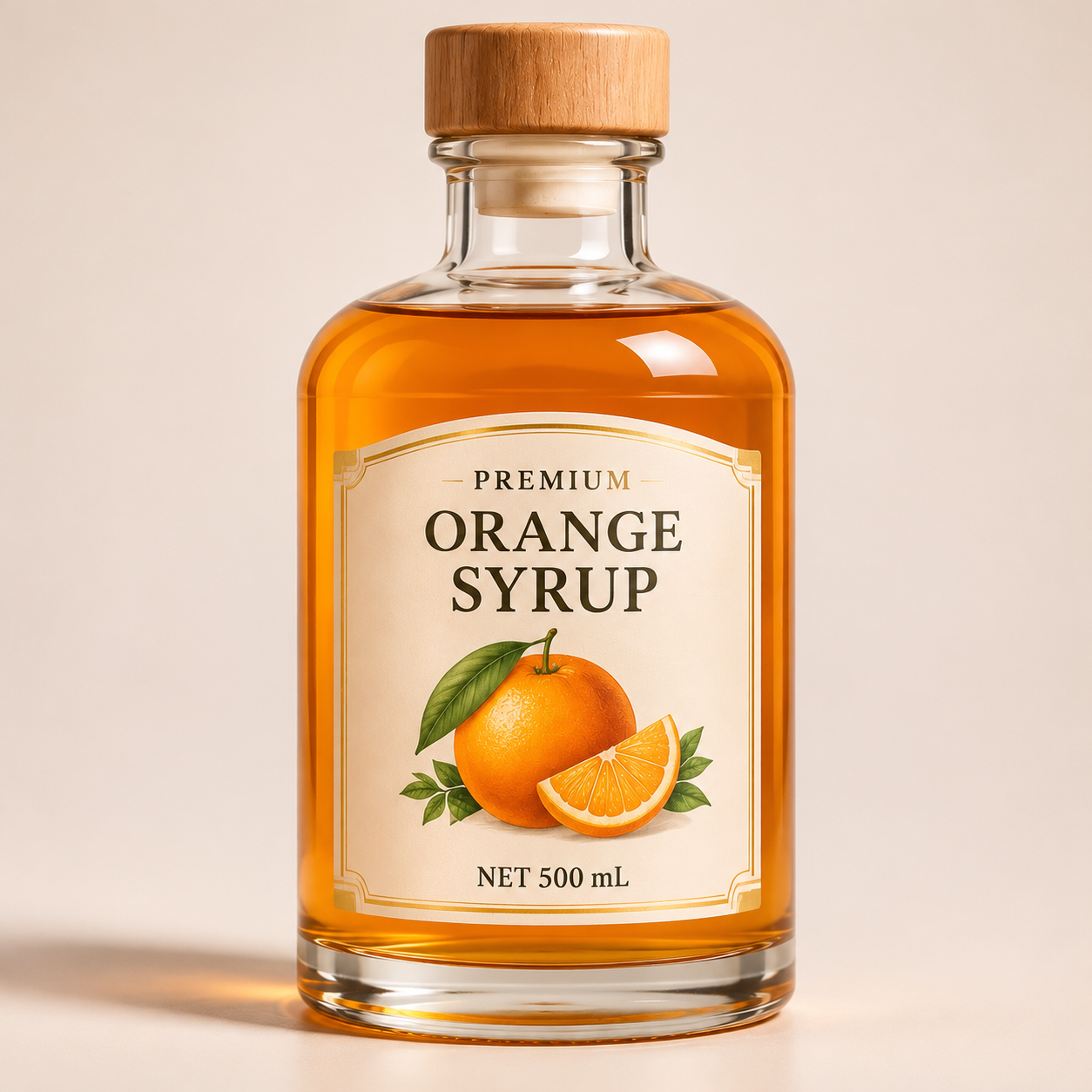
Source
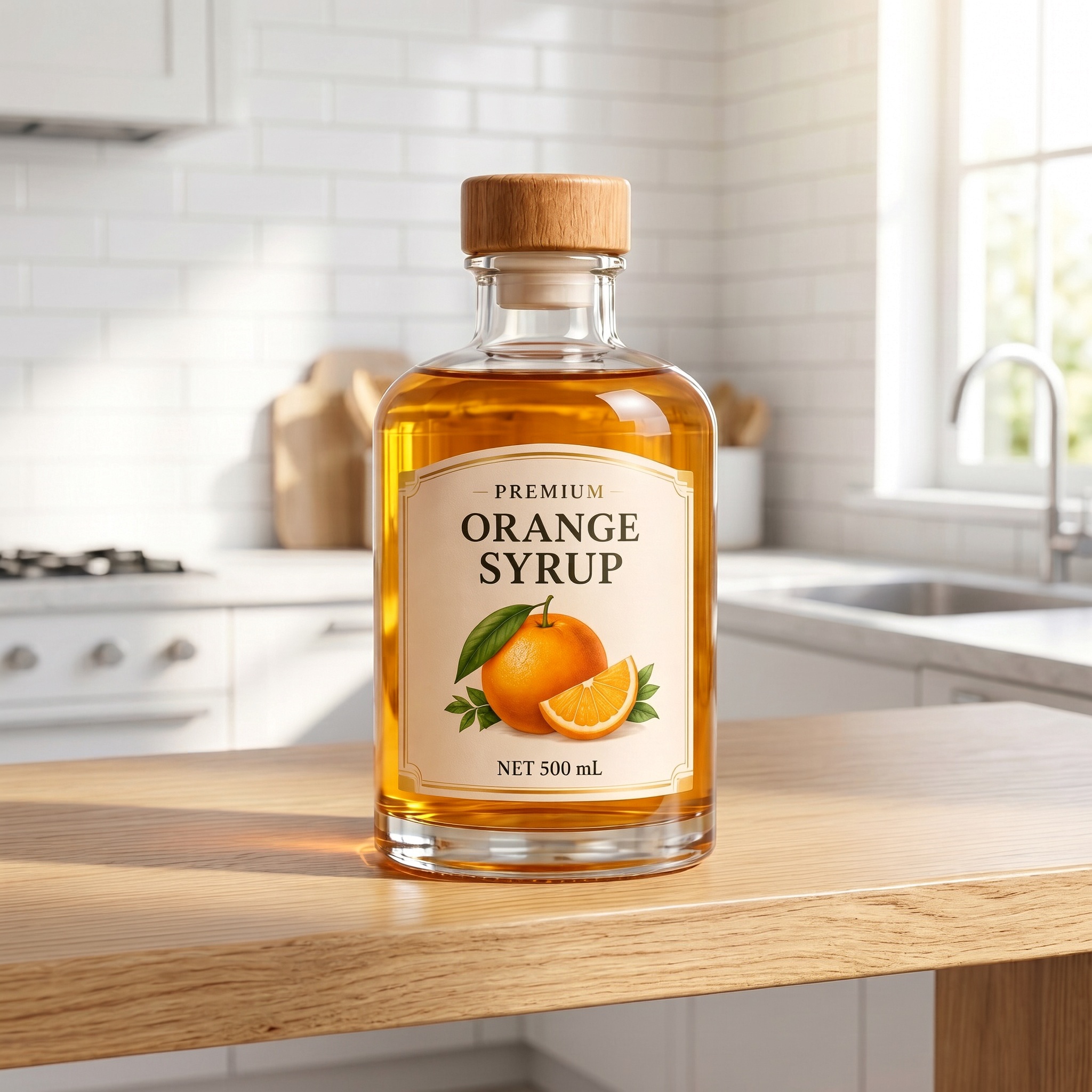
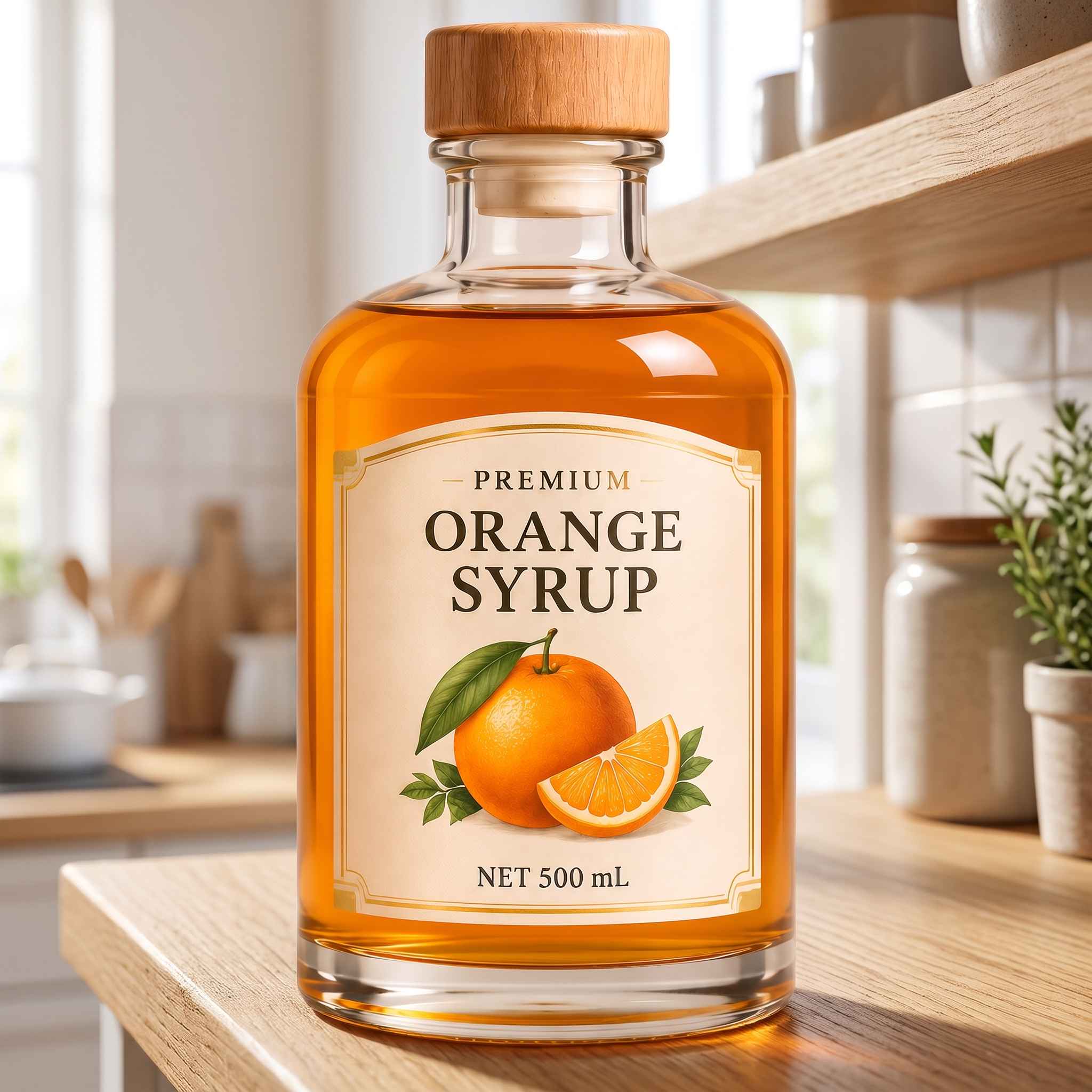
Result: MAI-Image-2.6 wins on faithful editing. Both models kept the label exactly as it was: every word, the orange illustration, and the gold border. Both also placed the bottle in a bright, believable kitchen with natural window light. MAI-Image-2.6 followed the instruction more closely. It kept the original close framing and the deep orange syrup, and it set the bottle on a light oak surface with open shelves behind it. H3 Image zoomed out and put the bottle on a kitchen countertop rather than a shelf. Its syrup also turned a lighter, more golden amber, which breaks the "keep the colors exactly the same" part of the brief.
Test 5: Three reference images in one scene
References: (1) a sneaker product shot, (2) a city rooftop at sunset, (3) a film-photo style sample. We used three references so both models stay within their limits (MAI-Image-2.6 takes up to five).
Prompt: "Place the sneaker from image 1 on the rooftop ledge from image 2, photographed in the film style of image 3."
What it tests: Whether each model keeps the product's design, uses the right location, and applies the style without mixing them up.
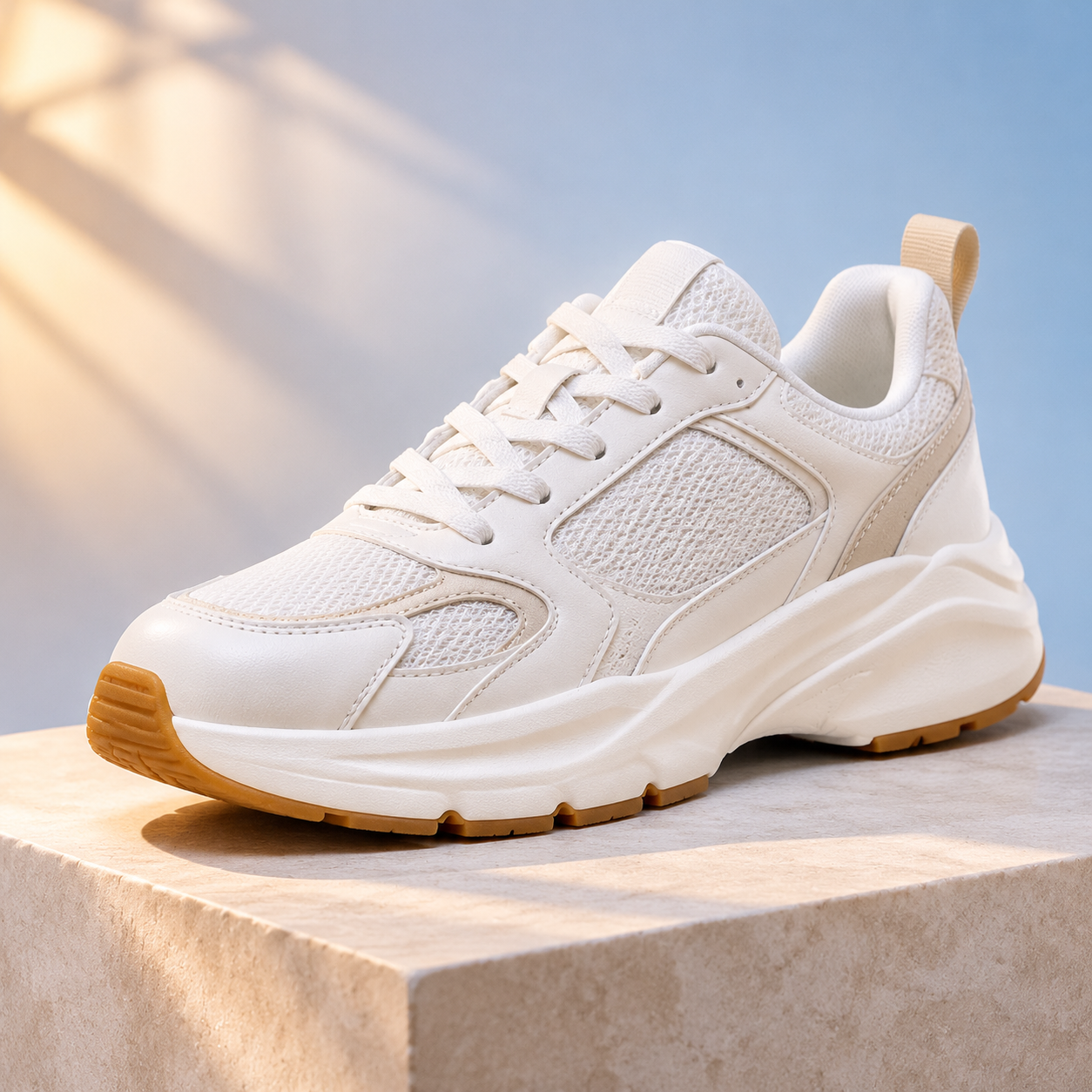
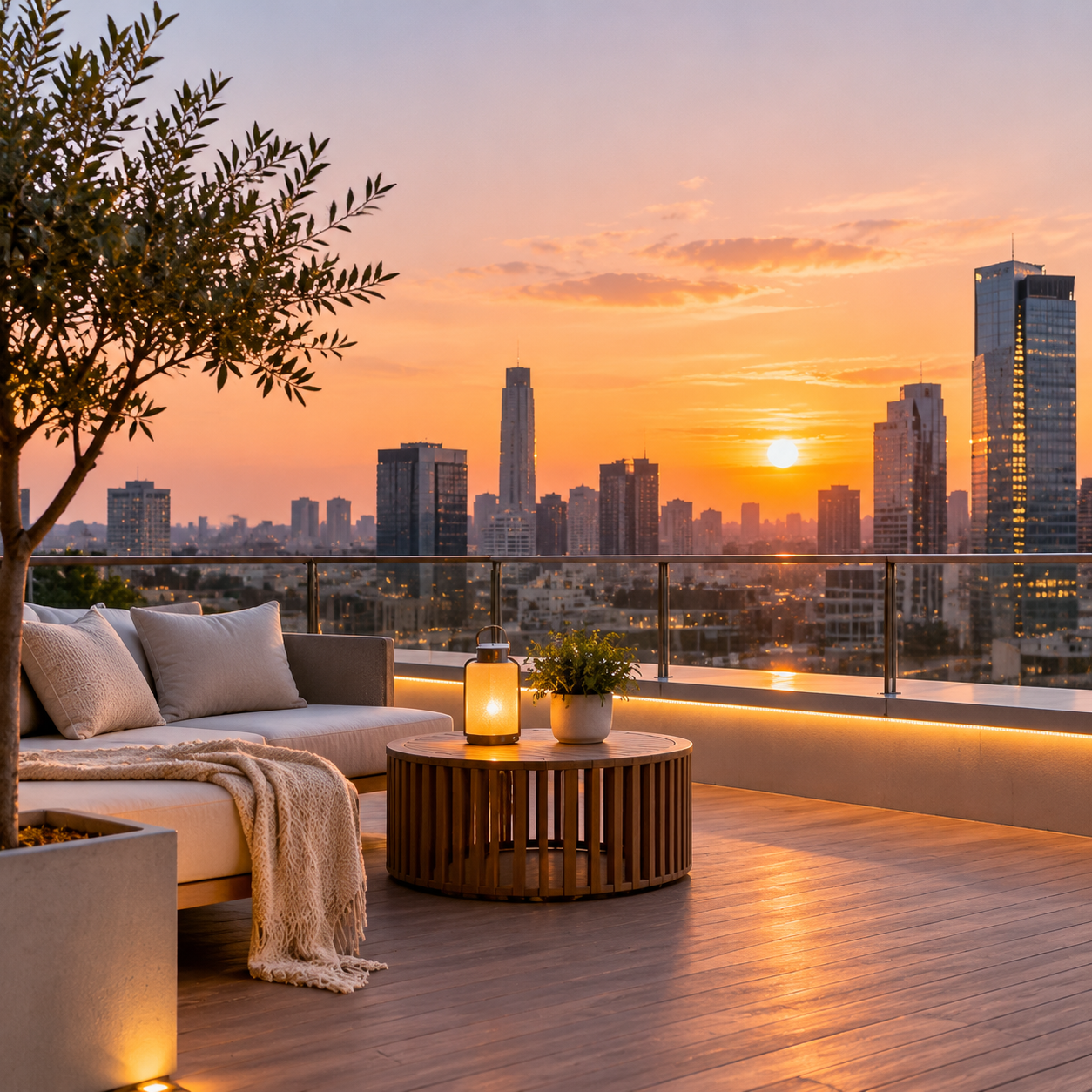
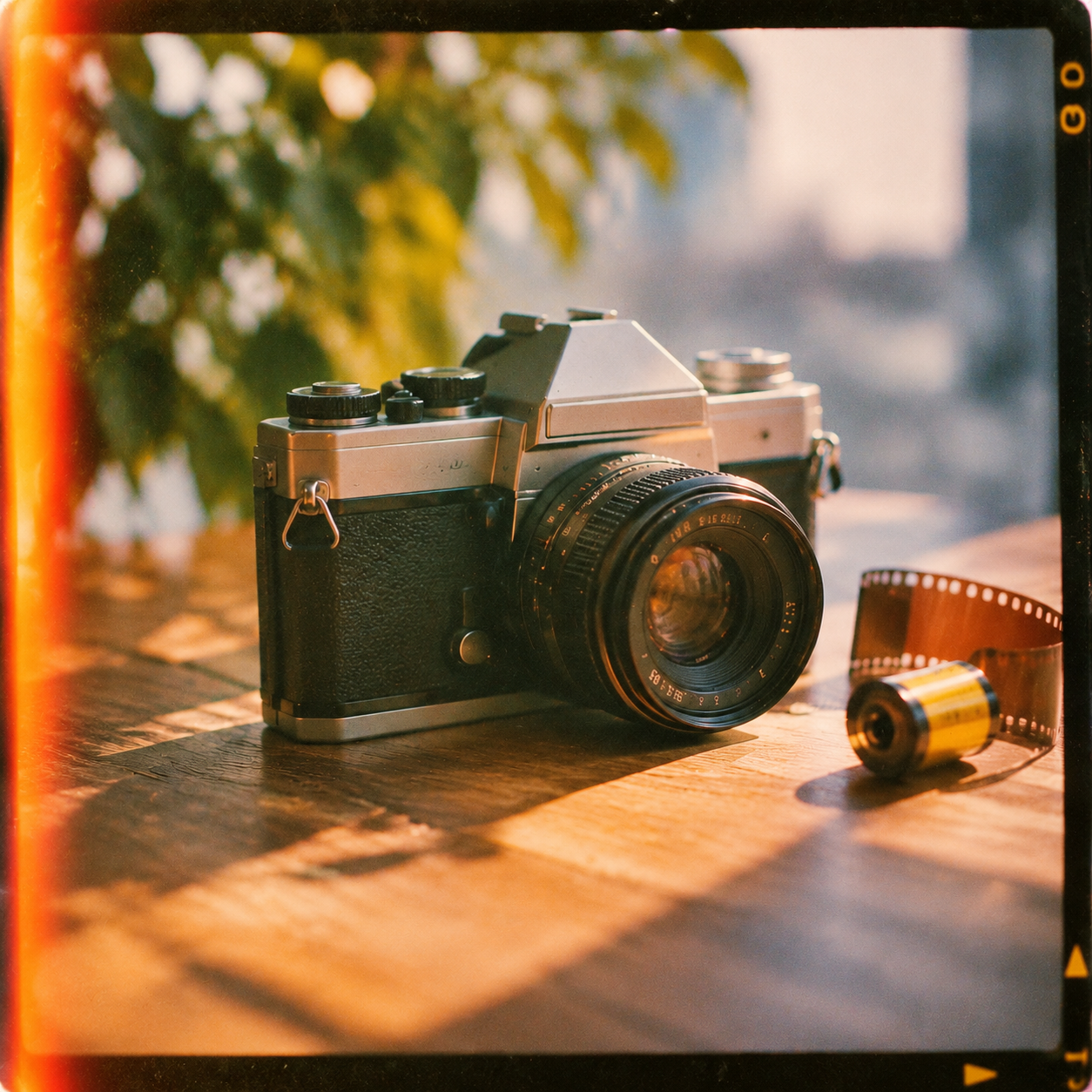
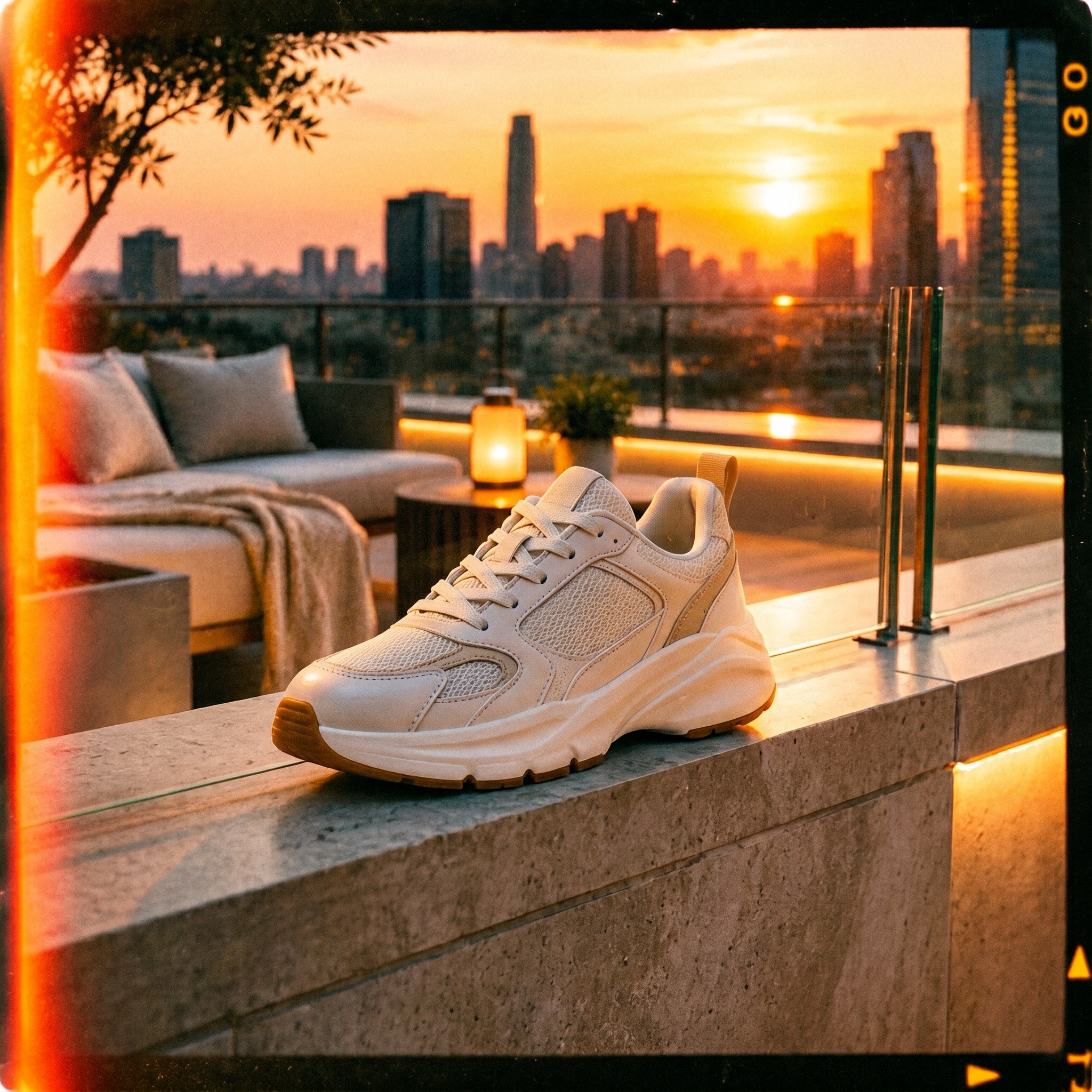
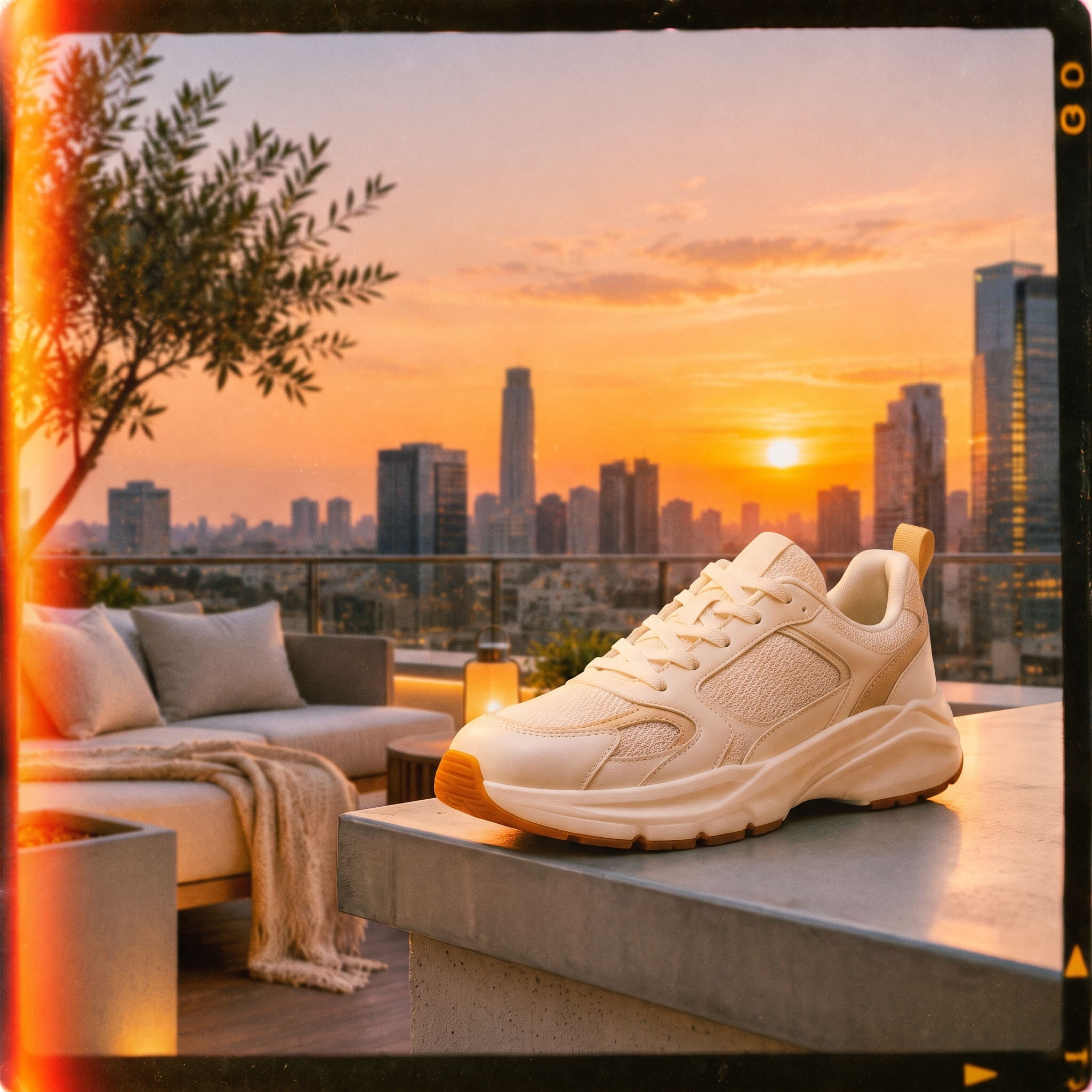
Result: a draw. Both models handled all three references well. Each kept the sneaker's design (mesh panels, overlays, gum sole, and pull tab) and rebuilt the rooftop from image 2 with its sofa, lantern, olive tree, and skyline. Both also copied the film frame from image 3, down to the light leak and edge markings. H3 Image blended the sources more naturally. It set the shoe on the ledge by the railing and gave the shoe the same grain and warm grade as the scene. Its weak spots are two stray glass posts beside the shoe and slightly messy laces. MAI-Image-2.6 kept the shoe closer to the original, with cleaner laces and stitching. But the shoe sits on a concrete block in the foreground, and it looks sharper and brighter than the backlit scene, so it reads as pasted in.
Test 6: Large-format detail (16:9)
Prompt: "Wide travel poster photo of a mountain village above a sea of clouds at sunrise, dense detail in tiled rooftops and terraced fields, no text."
What it tests: This is where H3 Image's native 4K should show. At page size the two may look close. At 100% zoom, the pixel gap matters.
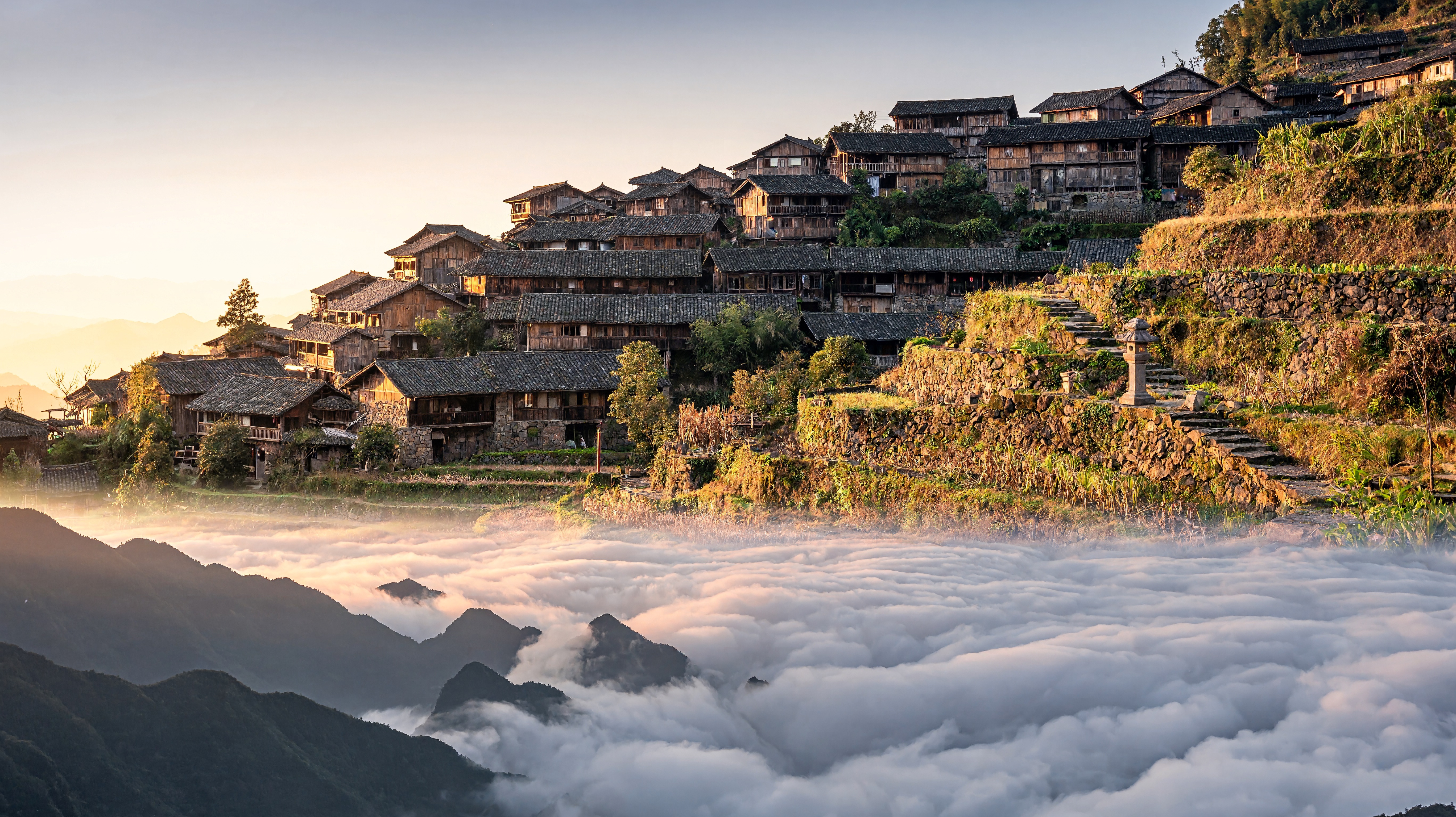
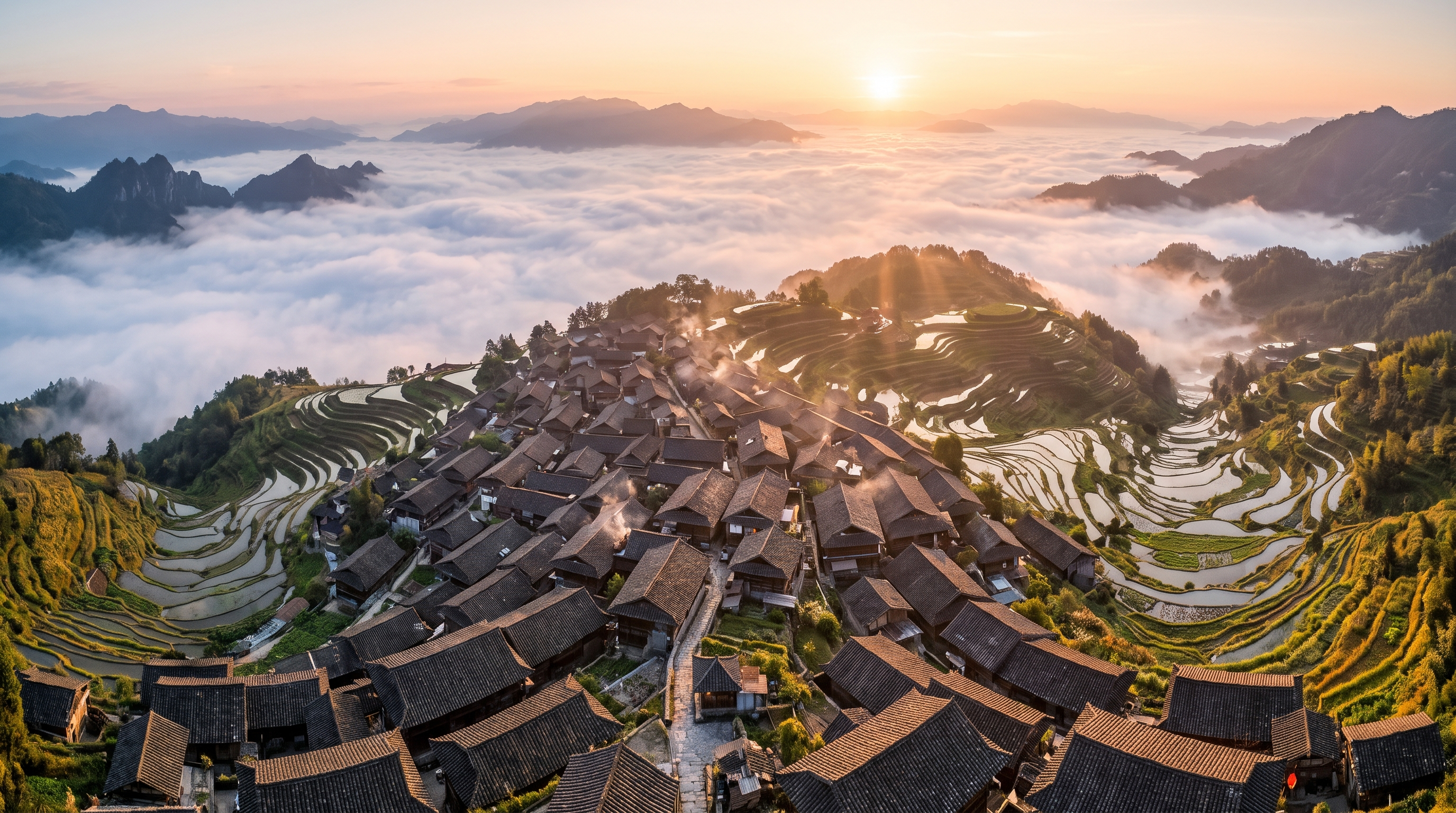
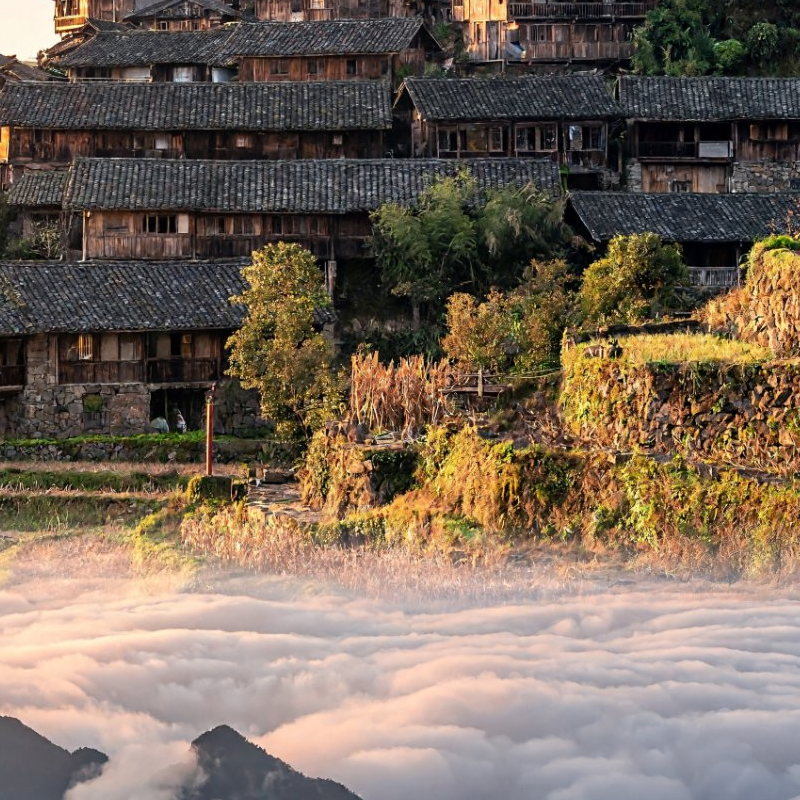
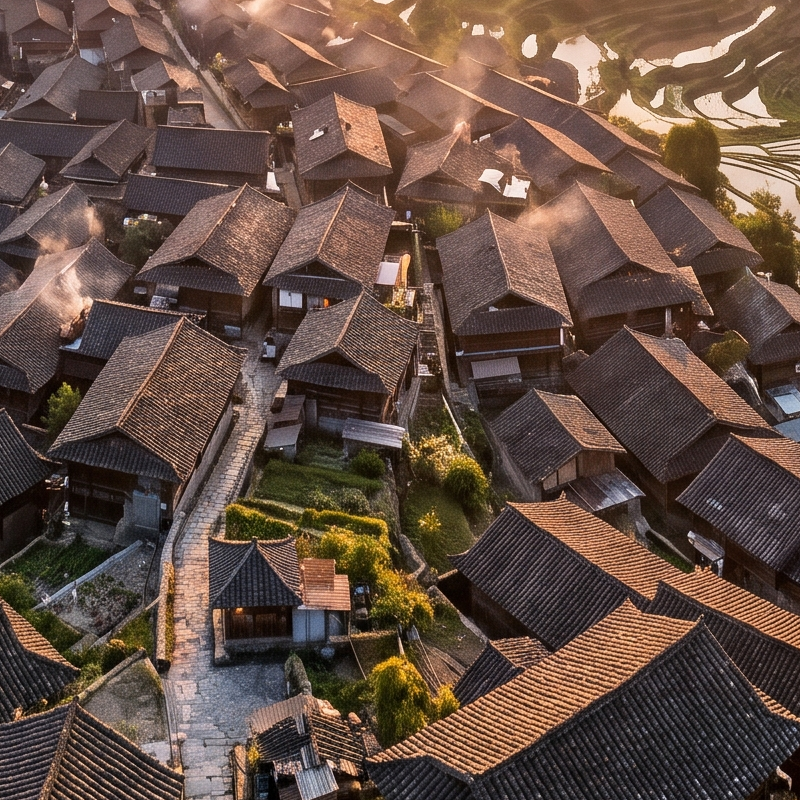
Result: MAI-Image-2.6 wins on the brief. It delivered the stronger travel poster. Its aerial view packs in hundreds of tiled roofs, water-filled rice terraces that wrap around the hills, and a sea of clouds lit by sunrise rays. Even when cropped, the roof tiles, stone lanes, and chimney smoke stay crisp. H3 Image chose a side view of a hillside village of wooden houses. Its rooftops, balconies, and stone walls are detailed and well lit. But its "terraced fields" are mostly grassy stone walls rather than real paddies, and the frame feels less like a poster. At page size, resolution didn't decide this test; composition and prompt fit did. H3 Image's 4K setting pays off mainly when you print large or crop deep.
Results at a glance
| Test | H3 Image score | MAI-Image-2.6 score | Winner |
|---|---|---|---|
| 1. Portrait realism | 7.5/10 | 8.5/10 | MAI-Image-2.6 |
| 2. Bilingual sign text | 7.5/10 | 6.5/10 | H3 Image |
| 3. Exact count | 7.5/10 | 9/10 | MAI-Image-2.6 |
| 4. Product edit | 7.5/10 | 9/10 | MAI-Image-2.6 |
| 5. Three references | 8.5/10 | 8.5/10 | Tie |
| 6. Large-format detail | 8/10 | 8/10 | MAI-Image-2.6 |
| Average | 7.8/10 | 8.4/10 | MAI-Image-2.6 (4–1–1) |
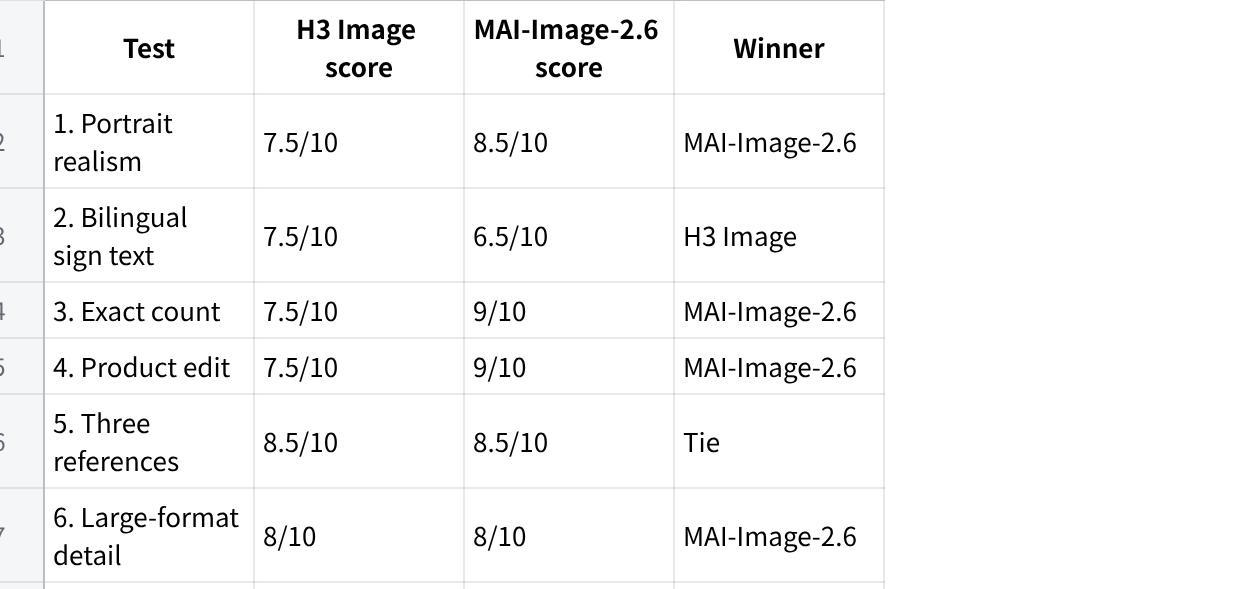
点击图片可查看完整电子表格
MAI-Image-2.6 won four of six briefs and averaged 8.4 against H3 Image's 7.8. Its biggest edge was control: it followed editing instructions closely and kept geometry, colors, and framing clean. H3 Image's wins came where you might not expect. It rendered our simplified Chinese sign more accurately and blended three references more naturally. Its most common flaw was over-processing, from HDR-like skin to small geometry slips.
What this test does not show: six briefs with one output each is a small sample. Results can change between runs, and both vendors update their models. Treat this as a first look, not a benchmark.
Resolution and detail
This is the biggest gap between the two. An H3 Image 4K file has about seven times as many pixels as MAI-Image-2.6's listed 1536 × 1536 maximum, and four times as many as the 2048 × 2048 files our test platform returned. Check the pixel size your platform actually delivers. That matters when you:
print posters, packaging, or large-format displays
crop one image into several assets (banner, square post, thumbnail)
need fine texture in materials, foliage, fabric, or architecture
In our own 12-test review, H3 Image's strongest scores were detail and lighting (8.8/10 each). The files we checked were true 4096 × 4096 JPEGs.
MAI-Image-2.6's lower ceiling is not a flaw for most screen work. A 1.5K image is plenty for social posts, slides, and web pages, and you can upscale it later. If you would upscale every output anyway, starting at native 4K saves a step and avoids upscaler artifacts.
In our tests: resolution didn't separate the models at page size. In the large-format test, MAI-Image-2.6 won on composition and prompt fit, and both images held clean rooftop detail in 100% crops. Native 4K is a spec advantage for print and deep crops. Check the pixel size your platform actually delivers before you rely on it.
References and editing
Both models accept reference images, but at different scales.
H3 Image takes up to 16 references. That suits product sets, character sheets, and mood boards, where you want one image to draw on many sources for subject, setting, and style. On h3imageai.net, each reference adds 1 credit per output.
MAI-Image-2.6 takes up to five input images when combining people, products, styles, and scenes. It launched as one of the best-ranked editing models on public leaderboards. On Design Arena it placed near the top for editing sign text. If your main job is changing an existing image (relighting a product shot, swapping a background, fixing a label) MAI-Image-2.6 has the stronger published editing record.
With either model, check edits closely. Faces, proportions, colors, and small details can shift after an edit, so compare the result against your source before you publish.
In our tests: editing went to MAI-Image-2.6. In the product edit, it kept the framing and the syrup color, while H3 Image reframed the shot and shifted the color. The three-reference test was a draw. Both models kept the sneaker's design and pulled in the rooftop and the film style. H3 Image blended the three sources more naturally, while MAI-Image-2.6 kept the product cleaner but looked more composited.
Text in images
Text rendering is where MAI-Image-2.6 has the clearer public evidence. On Design Arena it tied for first on a multilingual airport-sign prompt. One API provider also reports accurate Chinese signs and couplets. Its record on long, exact paragraphs is more middling: it tied 29th of 60 on a long exact-text poster.
MiniMax's announcement makes no text-rendering claims for H3 Image. In our review, a short English poster headline came out exactly right, but we only tested short text.
The practical rule is the same for both. Use the model for short headlines and signs, check every character, and set long copy or exact typography in a design tool.
In our tests: neither model got the bilingual sign fully right. Both spelled the English name correctly but dropped one of the four Chinese characters. H3 Image kept the simplified characters we asked for. MAI-Image-2.6 swapped one for its traditional form, despite its strong record on multilingual signs. Both also added extra signage with garbled text that you would need to remove or fix.
Speed
MiniMax says H3 Image can render a 4K image in under ten seconds and puts it at up to 5× the speed of mainstream alternatives. Its own figures vary by mode (1.5–2× for Standard and 3–4× for Highspeed), so treat the top number as a best case. Real waiting time on any hosted service also depends on the queue.
Microsoft's speed option is a separate model. MAI-Image-2.6-Flash is pitched for high-volume, latency-sensitive work, with Microsoft claiming 2.8× faster generation than GPT-Image-2-Medium. A common pattern is to explore ideas with Flash and render finals with the full model.
Access, openness, and control
H3 Image is open-weight. Teams with suitable GPUs can download and run it, fine-tune it, or keep images on their own infrastructure. MiniMax hasn't detailed the license or hardware needs on its announcement page, so check the Hugging Face model card before commercial self-hosting. If you don't want to manage GPUs, our studio runs in the browser.
MAI-Image-2.6 is closed. You use it through Microsoft: MAI Playground for hands-on testing, Microsoft Foundry for production, or third-party gateways. That brings Azure's enterprise tooling, but no self-hosting. Developers should also note two limits: some gateways reject seed and negative_prompt parameters, and OpenRouter lists no EU in-region routing.
Pricing
The two models bill differently, so here are rough per-image figures.
H3 Image on h3imageai.net uses one-time credit packs with no subscription. Purchased credits don't expire. See the pricing page for current terms.
| Output | Credits | Starter ($9.90 / 500) | Studio ($99.90 / 6,000) |
|---|---|---|---|
| 1K or 2K image | 3 | ≈ $0.06 | ≈ $0.05 |
| 4K image | 8 | ≈ $0.16 | ≈ $0.13 |
| 2K edit with 1 reference | 4 | ≈ $0.08 | ≈ $0.07 |
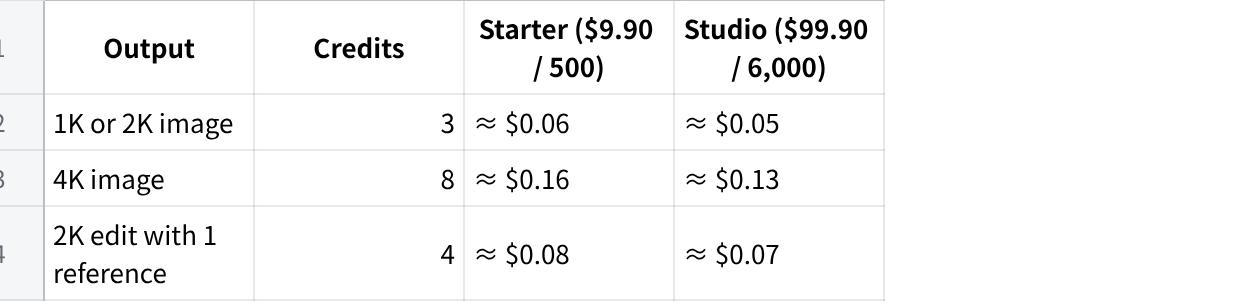
点击图片可查看完整电子表格
MAI-Image-2.6 on Microsoft Foundry costs $5 per million text-input tokens, $8 per million image-input tokens, and $38 per million image-output tokens. Press coverage of the Foundry launch put that at about 4 cents per image. Third-party resellers charge more; one lists $0.12 per image (Flash: $0.06).
At typical screen sizes, MAI-Image-2.6 through Foundry is the cheaper option per image. H3 Image's 4K outputs cost more per file but contain four to seven times the pixels. If you need large files, compare cost per usable 4K asset, including any upscaling step, rather than cost per generation.
Which should you choose?
| Your priority | Better fit |
|---|---|
| Print, packaging, large displays | H3 Image |
| Many references in one image (6–16) | H3 Image |
| Self-hosting or fine-tuning | H3 Image |
| Pay once, no subscription or cloud account | H3 Image |
| Editing existing photos precisely | MAI-Image-2.6 |
| Multilingual signs and labels | Test both (H3 Image won our Chinese sign test) |
| Visuals that use current web information | MAI-Image-2.6 |
| Azure-based enterprise pipeline | MAI-Image-2.6 |
| Lowest cost per screen-size image at volume | MAI-Image-2.6 (or Flash) |
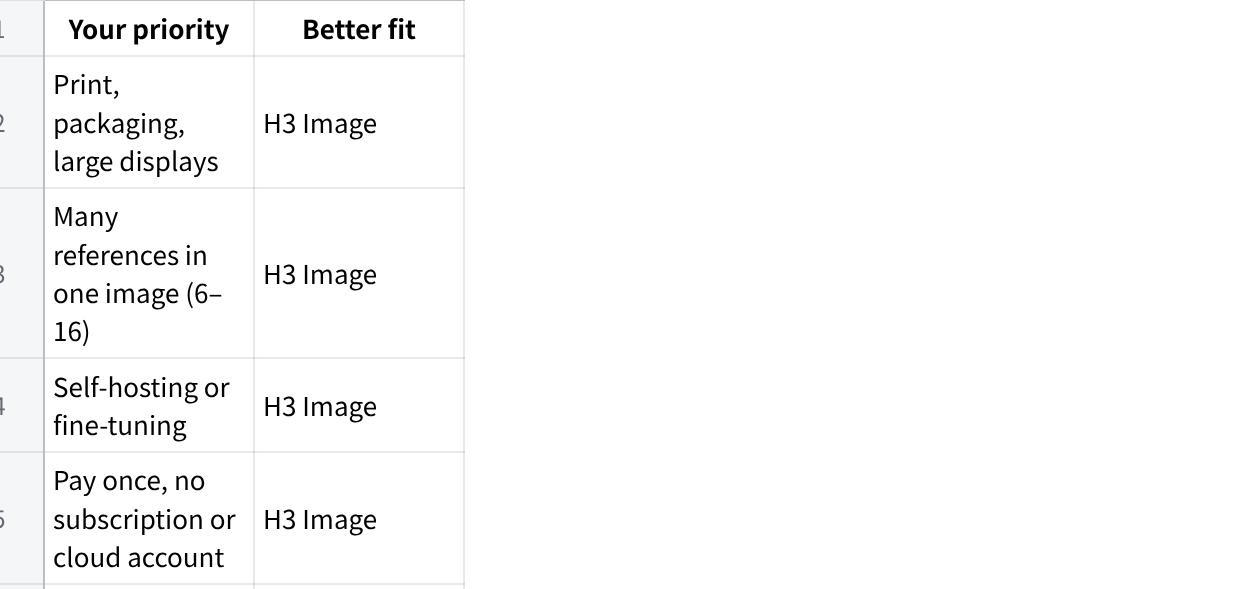
点击图片可查看完整电子表格
Final verdict
In our tests, MAI-Image-2.6 was the more reliable model for everyday photoreal work. It won four of six briefs and was clearly ahead on editing, where it changed only what we asked. If your job is retouching product shots or producing clean images at screen sizes, start there.
That doesn't make H3 Image the weaker choice for every job. It renders natively at up to 4096 × 4096 and takes up to 16 reference images, against MAI-Image-2.6's five. It beat MAI-Image-2.6 on simplified Chinese text and blended references more naturally. It's also open-weight, and here it's sold in one-time credit packs. Its 4K setting is worth using for print and deep crops, even though it made no visible difference at page size in our tests. Choose by the job, not the leaderboard.
Want to check a brief of your own? Run it in the H3 Image studio and in MAI Playground, then compare the files at 100% zoom. Resolution differences only show up there.