
H3 Image vs GPT Image 2.6: Which AI Image Generator Is Better?
Read the verdict
H3 Image vs GPT Image 2.6: Which model creates better images, follows prompts more accurately, and handles text more reliably?
Both models offer powerful AI image generation capabilities, but they approach creative tasks differently.
MiniMax H3 Image emphasizes high-resolution still-image generation, reference-driven creation, and detailed visual composition. GPT Image 2.6 offers image generation alongside editing-oriented workflows and additional creative output capabilities.
Feature lists alone cannot tell us which model produces better results.
To explore the differences, we generated six original images using three identical prompts: one image from H3 Image and one from GPT Image 2.6 for each scenario.
Our tests covered:
Photorealism and architectural lighting
Complex prompt following and spatial relationships
English text rendering and visual accuracy
The results were not identical. Both models produced attractive images, but GPT Image 2.6 handled two specific instructions more successfully.
Here is what we found.
Quick Verdict: H3 Image vs GPT Image 2.6
GPT Image 2.6 was the narrow winner in our three real-world tests, particularly in complex spatial relationships and the visual accuracy of an educational poster.
However, H3 Image remained competitive in photorealism, object-count accuracy, typography, and overall composition.
The better choice depends on your creative workflow.
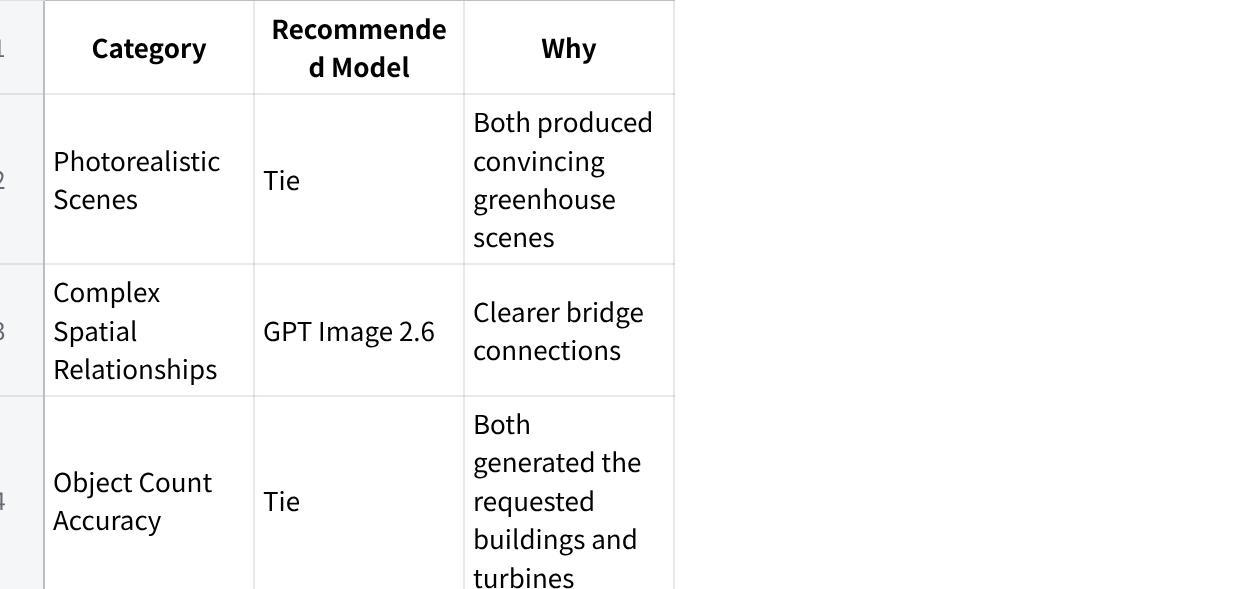
| Category | Recommended Model | Why |
|---|---|---|
| Photorealistic Scenes | Tie | Both produced convincing greenhouse scenes |
| Complex Spatial Relationships | GPT Image 2.6 | Clearer bridge connections |
| Object Count Accuracy | Tie | Both generated the requested buildings and turbines |
| English Text Rendering | Tie | Both reproduced the requested text correctly |
| Visual-Semantic Accuracy | GPT Image 2.6 | More recognizable depiction of Venus |
| Native High-Resolution Output | H3 Image | Documented native 16MP capability |
| Multi-Reference Creation | H3 Image | Supports up to 16 reference images |
| Markup-Guided Editing | GPT Image 2.6 | Editing-oriented workflow |
| GIF and SVG Workflows | GPT Image 2.6 | Additional output capabilities |
| Overall Tested Results | GPT Image 2.6 | Narrow advantage in two tested requirements |
点击图片可查看完整电子表格
Bottom line: Choose H3 Image if you prioritize high-resolution still images and reference-driven creation. Consider GPT Image 2.6 if you need flexible editing workflows or if the kinds of spatial and visual-accuracy tasks in our tests matter most.
Our results reflect three single-generation comparisons, not a comprehensive benchmark of either model.
H3 Image vs GPT Image 2.6: Key Differences
Before examining the test images, it helps to understand how the two models differ.
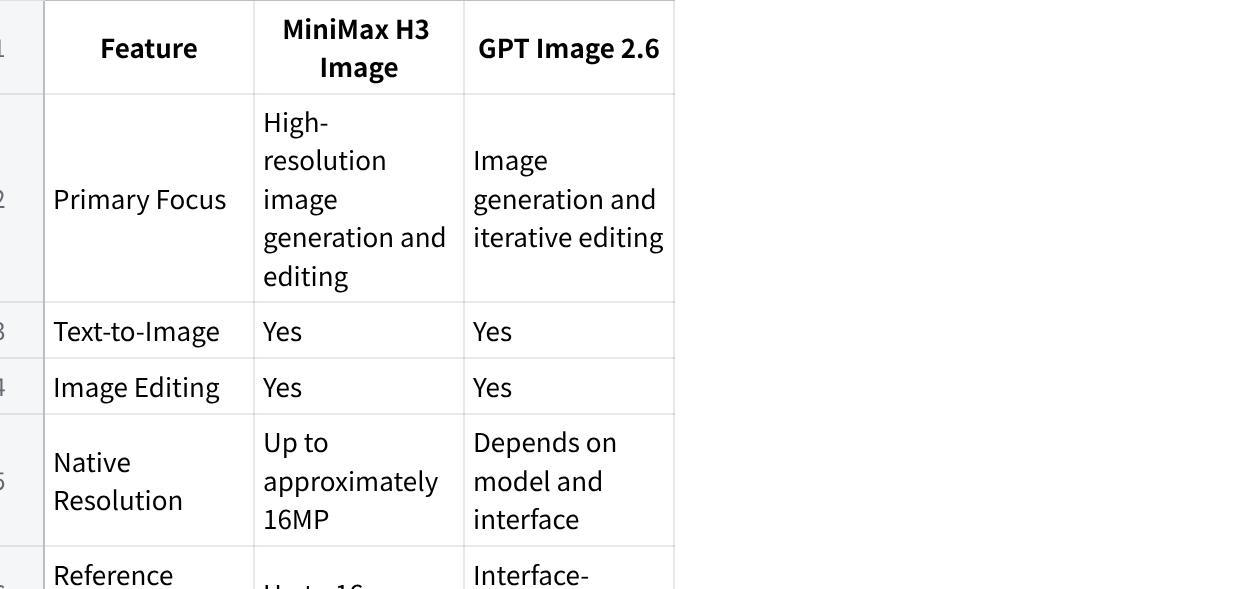
| Feature | MiniMax H3 Image | GPT Image 2.6 |
|---|---|---|
| Primary Focus | High-resolution image generation and editing | Image generation and iterative editing |
| Text-to-Image | Yes | Yes |
| Image Editing | Yes | Yes |
| Native Resolution | Up to approximately 16MP | Depends on model and interface |
| Reference Images | Up to 16 | Interface-dependent |
| Multi-Image Composition | Supported | Workflow-dependent |
| Markup-Guided Editing | Not verified in our tested interface | Supported |
| GIF Generation | Not available in the tested H3 interface | Supported in relevant workflows |
| SVG Output | Not available in the tested H3 interface | Available through supported API workflows |
| Pricing Model | Platform credits | API usage or platform-specific pricing |
| Tested Platform | H3 Image AI | GPT Image 2.6 access platform |
点击图片可查看完整电子表格
These are product and workflow differences, not proof of superior image quality.
A model with more editing options does not necessarily produce better photographs. Likewise, a model offering higher output resolution does not automatically follow instructions more accurately.
That is why we tested both models using identical prompts.
What Is MiniMax H3 Image?
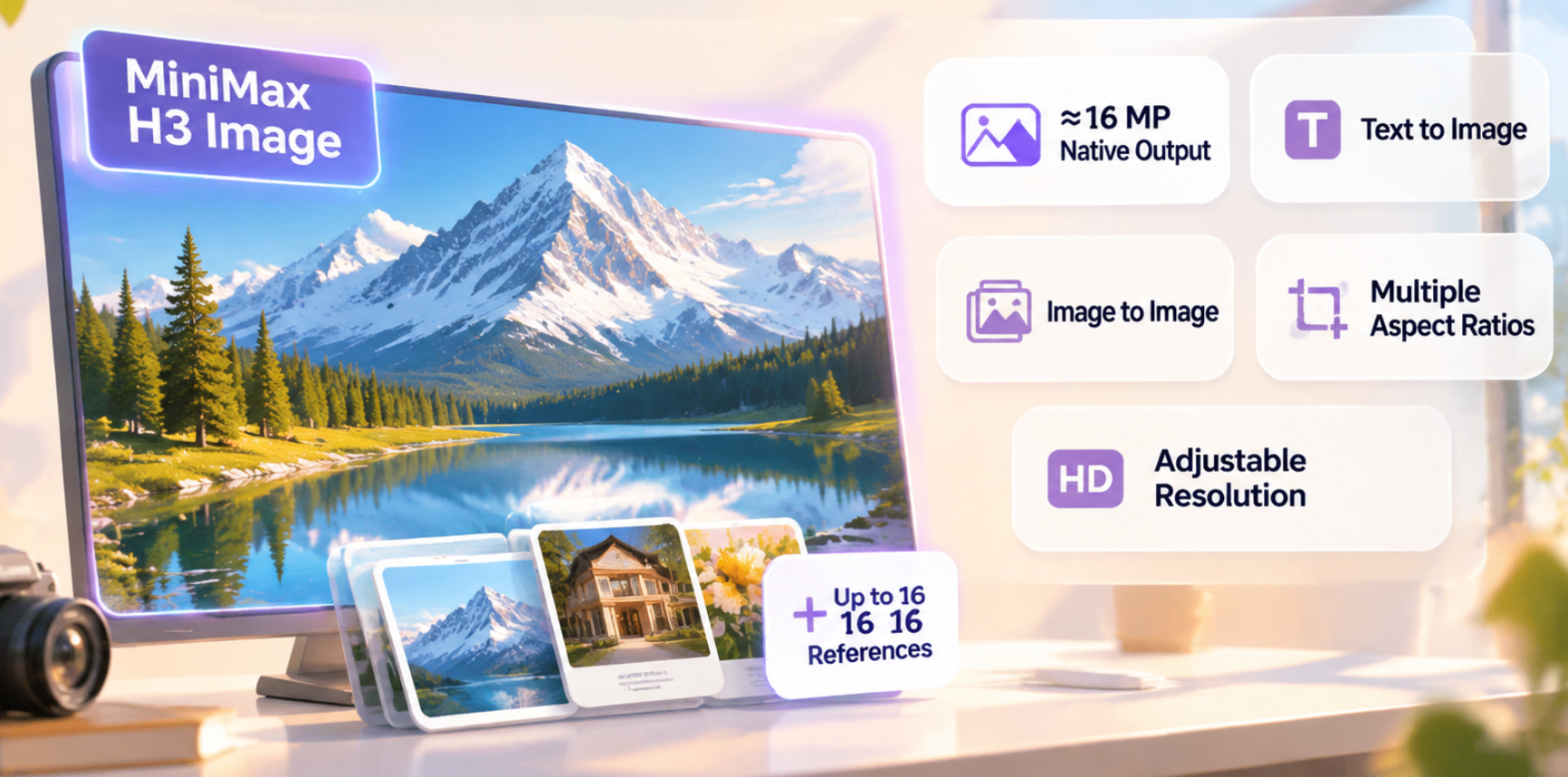
MiniMax H3 Image is an AI image generation and editing model designed for detailed visual creation.
Its advertised capabilities include native high-resolution output, multi-reference image support, and text-guided image creation.
Through H3 Image AI, users can access a browser-based generator with Text to Image and Image to Image modes.
The interface provides options for aspect ratio and resolution.
Key capabilities include:
Native image output of approximately 16 megapixels
Support for up to 16 reference images
Text-to-image generation
Image-to-image workflows
Multiple aspect ratios
Adjustable output resolution
These features make H3 Image relevant to architectural visualization, detailed illustrations, product concepts, and creative projects involving multiple visual references.
For our tests, we used the Text to Image mode with the 1:1 aspect ratio and 2K resolution setting.
What Is GPT Image 2.6?
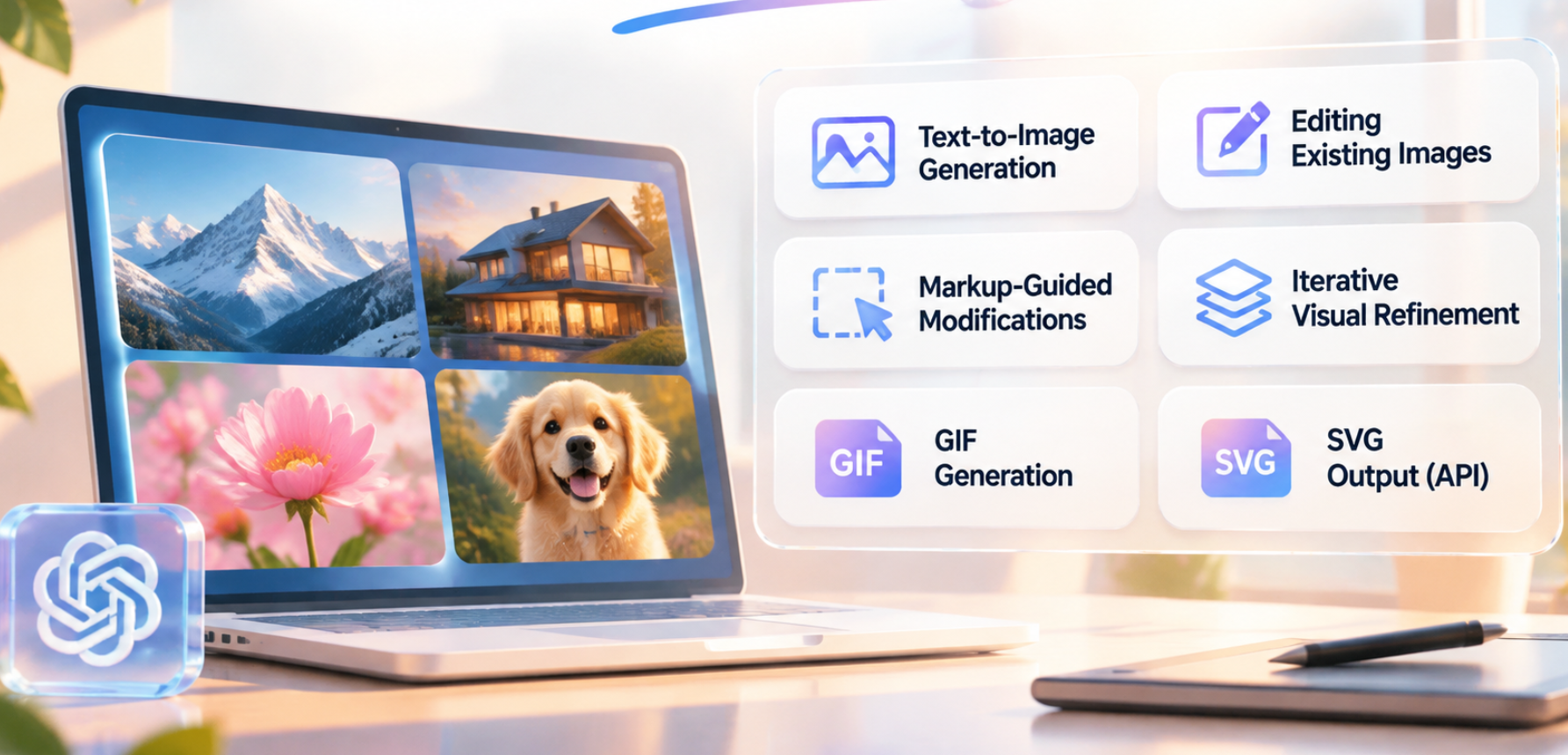
GPT Image 2.6 is an image generation model family from OpenAI.
Its capabilities extend beyond generating an image from a written description, with workflows designed for editing, iteration, and additional visual output formats.
The model family includes variants aimed at different generation and editing priorities.
Relevant capabilities include:
Text-to-image generation
Editing existing images
Markup-guided modifications
Iterative visual refinement
GIF generation in supported workflows
SVG output through supported API workflows
Actual functionality may vary depending on the product interface and model variant being used.
In this comparison, we evaluated three images generated using GPT Image 2.6 with the same prompts used for H3 Image.
We did not independently test its editing tools, GIF generation, or SVG output.
How We Tested H3 Image and GPT Image 2.6
We designed three prompts to test different image-generation challenges.
Instead of relying on promotional examples, we evaluated original outputs generated for this article.
Both models received identical English prompts for each scenario.
No reference images were used, and the images were evaluated without post-generation corrections.
Test Settings
| Setting | H3 Image | GPT Image 2.6 |
|---|---|---|
| Test Scenarios | 3 | 3 |
| Prompts | Original prompts | Identical prompts |
| Mode | Text to Image | Text to Image |
| Output Shape | Square | Square |
| Resolution Setting | 2K | Not recorded |
| Reference Images | None | None |
| Images Evaluated | 3 | 3 |
| Actual Credits | 9 total | Not recorded |
| Generation Time | Not recorded | Not recorded |
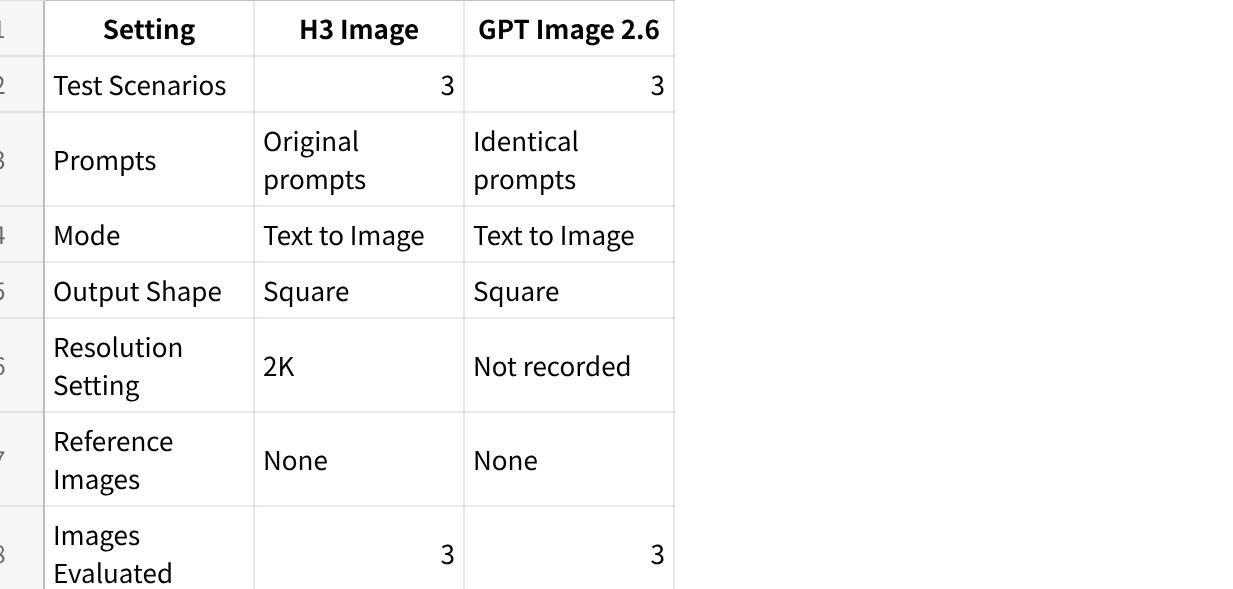
点击图片可查看完整电子表格
Each model was evaluated using one output per prompt.
Testing note: Because GPT Image 2.6's exact resolution setting was not recorded, this is a practical same-prompt visual comparison rather than a strictly controlled same-resolution benchmark. We also cannot compare generation speed or monetary cost from these runs.
We evaluated the images according to visible prompt adherence, scene composition, structural coherence, text accuracy, and factual visual details.
Test 1: Photorealism — Arctic Glass Greenhouse
Our first test focused on architectural photography.
We wanted to see how each model handled transparent glass, warm interior lighting, snow, northern lights, and complex architectural geometry.
The Prompt
Create a photorealistic architectural photograph of a large curved glass greenhouse in a remote Arctic landscape at night. Inside the greenhouse, lush tropical plants grow beneath warm golden lights. Outside, deep snow covers the ground, and green and violet northern lights stretch across the sky. The glass panels reflect the aurora naturally while revealing the interior plants. Accurate architectural geometry, realistic glass transparency, physically plausible reflections, cinematic winter atmosphere, professional architectural photography. Centered composition, square format. No people, no text, no logos, no watermark.
H3 Image vs GPT Image 2.6 Results
H3 Image Results
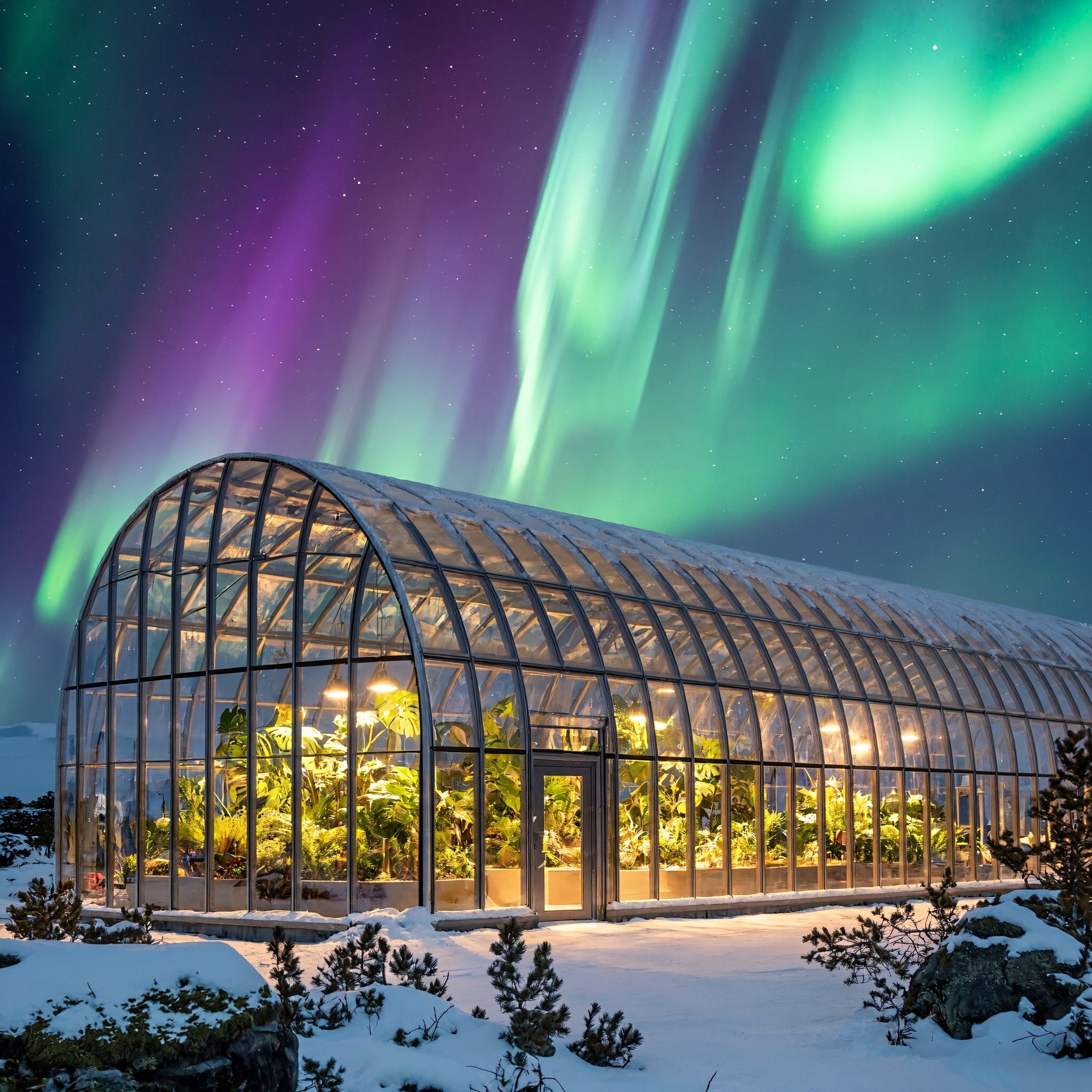
H3 Image created a large glass greenhouse viewed from a three-quarter angle.
The building extends across the frame, giving the viewer a strong sense of architectural depth.
The repeating metal supports remain generally coherent, while warm golden interior lights illuminate the tropical plants.
The surrounding snow and green-purple aurora create a convincing contrast between the cold exterior and the warm greenhouse interior.
The image resembles professional environmental architectural photography.
However, some glass reflections are difficult to distinguish from objects visible through the panels. Certain interior areas also appear visually dense.
GPT Image 2.6 Results
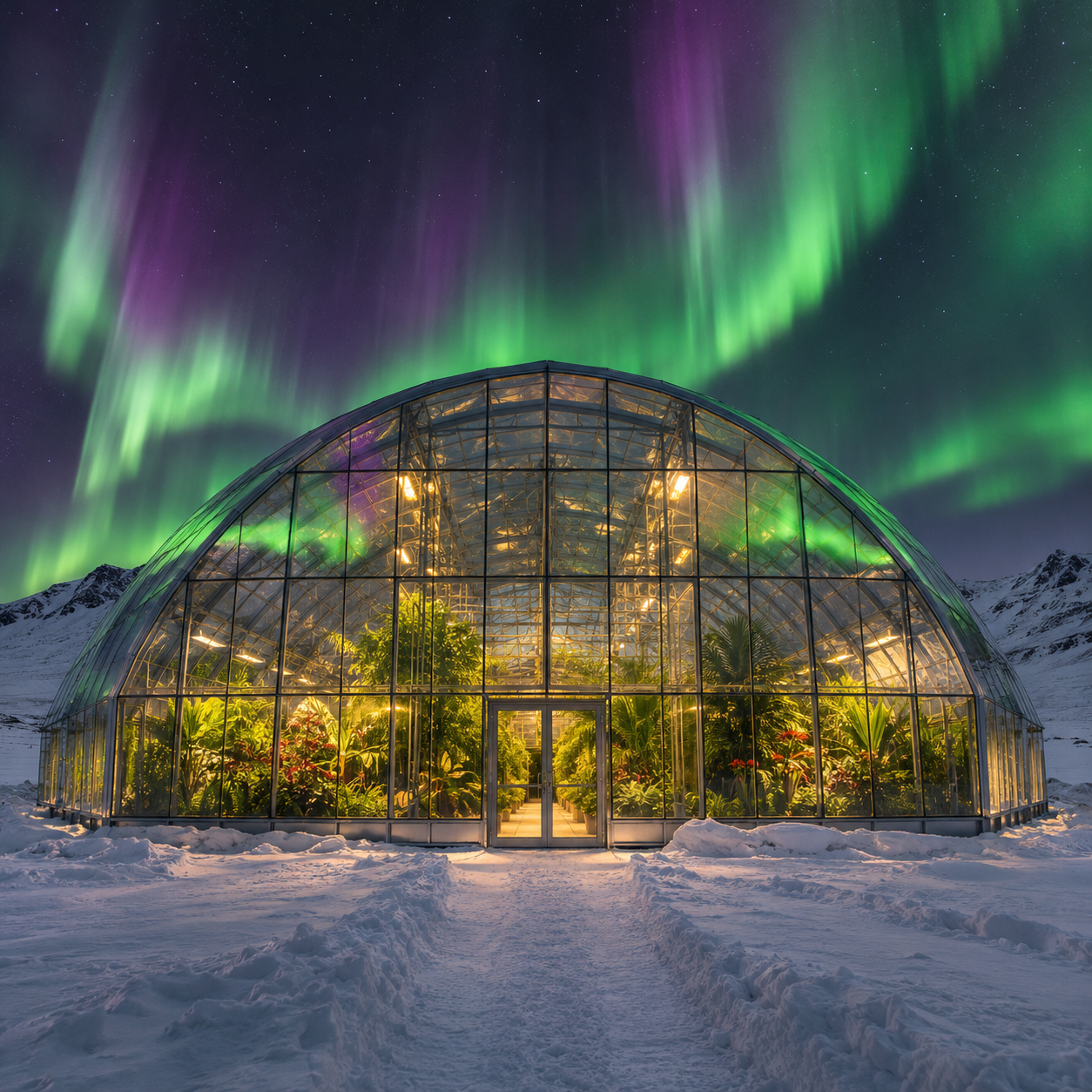
GPT Image 2.6 generated a more symmetrical, front-facing greenhouse.
The central entrance and curved glass roof are clearly defined, and the overall building structure appears balanced.
The interior vegetation is recognizable through the glass, while warm lights contrast with the snow-covered surroundings.
The aurora is vivid and occupies a large portion of the sky.
Compared with H3 Image, this composition emphasizes symmetry and visual impact rather than the length of the building.
Its central framing makes the architectural layout easy to understand, although less of the greenhouse's side structure is visible.
Side-by-Side Comparison
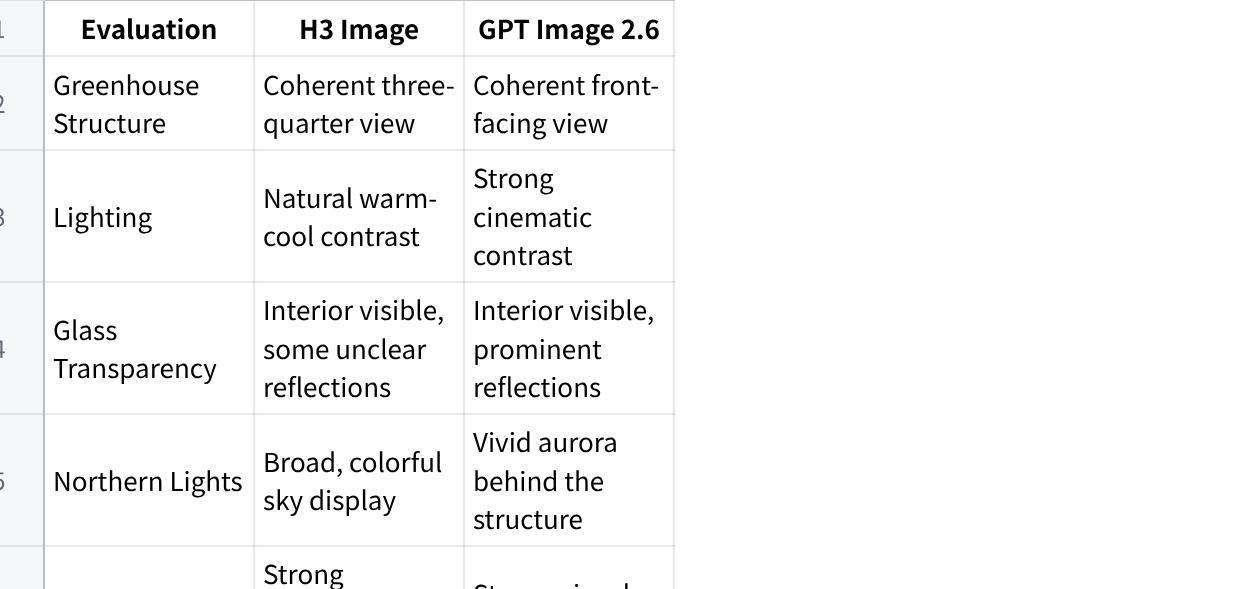
| Evaluation | H3 Image | GPT Image 2.6 |
|---|---|---|
| Greenhouse Structure | Coherent three-quarter view | Coherent front-facing view |
| Lighting | Natural warm-cool contrast | Strong cinematic contrast |
| Glass Transparency | Interior visible, some unclear reflections | Interior visible, prominent reflections |
| Northern Lights | Broad, colorful sky display | Vivid aurora behind the structure |
| Composition | Strong architectural depth | Strong visual symmetry |
| Main Weakness | Reflection clarity | Less visible architectural depth |
点击图片可查看完整电子表格
Winner: Tie
Both models successfully generated the requested environment.
H3 Image produced a convincing architectural scene with greater visible depth, while GPT Image 2.6 delivered a symmetrical and visually dramatic composition.
Neither output demonstrated a decisive advantage in overall photorealism.
Best takeaway: Both models are capable of generating attractive architectural scenes, but their compositional interpretations may differ even when using identical prompts.
Test 2: Prompt Following — Floating Eco-City
Our second test was designed to challenge instruction following.
The prompt included exact object counts, specific locations, and a spatial relationship between buildings.
This made it easier to identify whether a model had followed the instructions rather than simply produced an attractive image.
The Prompt
Create a detailed isometric illustration of a futuristic floating ecological island above a sea of clouds. Place exactly three modern white buildings around a circular central garden. Include exactly two wind turbines on the left side, a narrow wooden bridge connecting the buildings, and one waterfall flowing from the island's right edge. Surround the structures with green trees and small solar panels. Three-quarter isometric view, clean architectural design, coherent geometry, soft daylight, precise object placement. No additional buildings, no text, no logos.
H3 Image vs GPT Image 2.6 Results
H3 Image Results
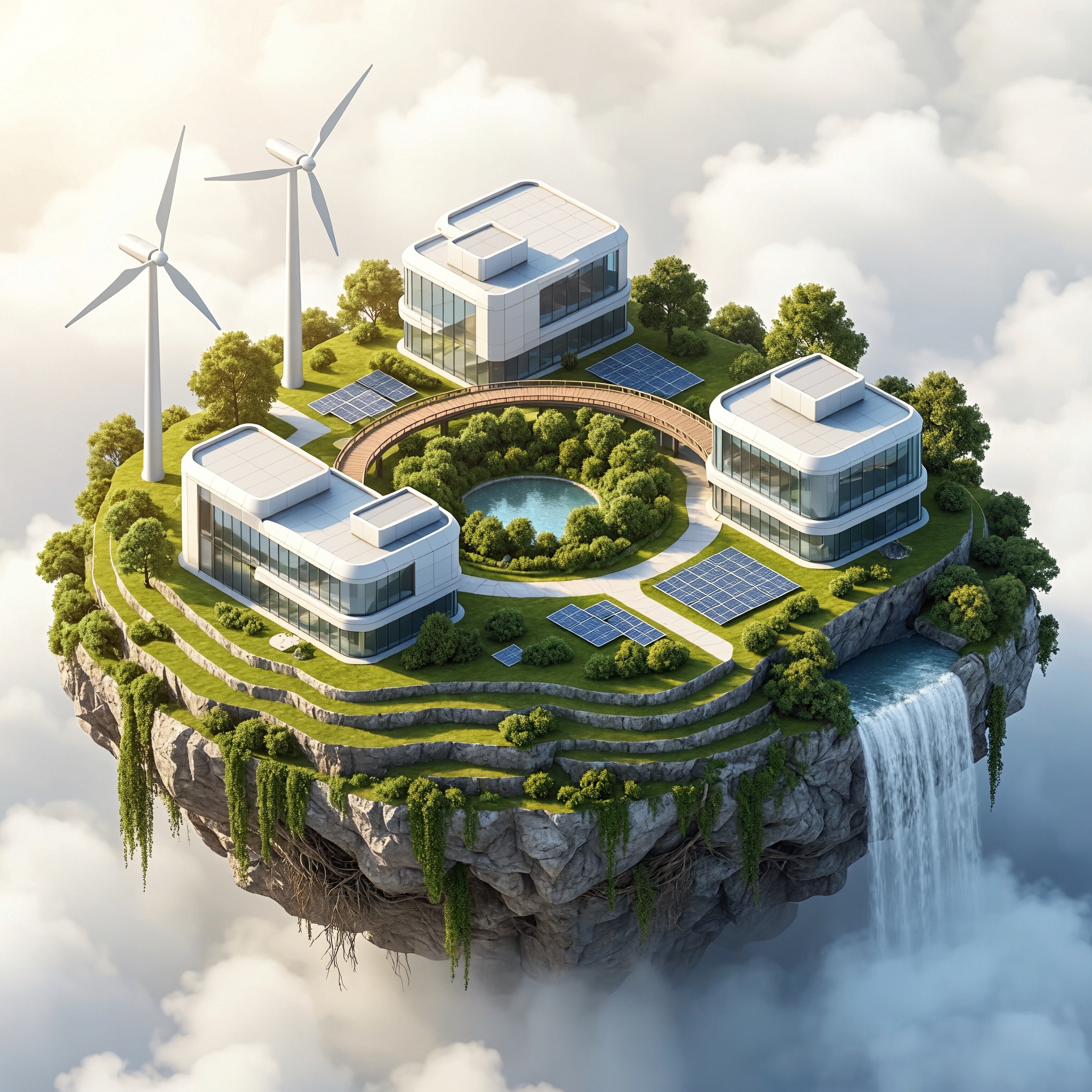
H3 Image generated exactly three white buildings positioned around a circular garden.
It also included two wind turbines on the left side, solar panels, vegetation, and a waterfall descending from the island's right edge.
The island's overall structure was coherent.
The white buildings, green landscape, and surrounding clouds formed a clean architectural illustration.
However, the wooden bridge appeared primarily as a curved walkway around the central garden.
It did not clearly connect all three buildings as requested.
The image also resembled a polished three-dimensional architectural rendering rather than a strict technical isometric illustration.
GPT Image 2.6 Results
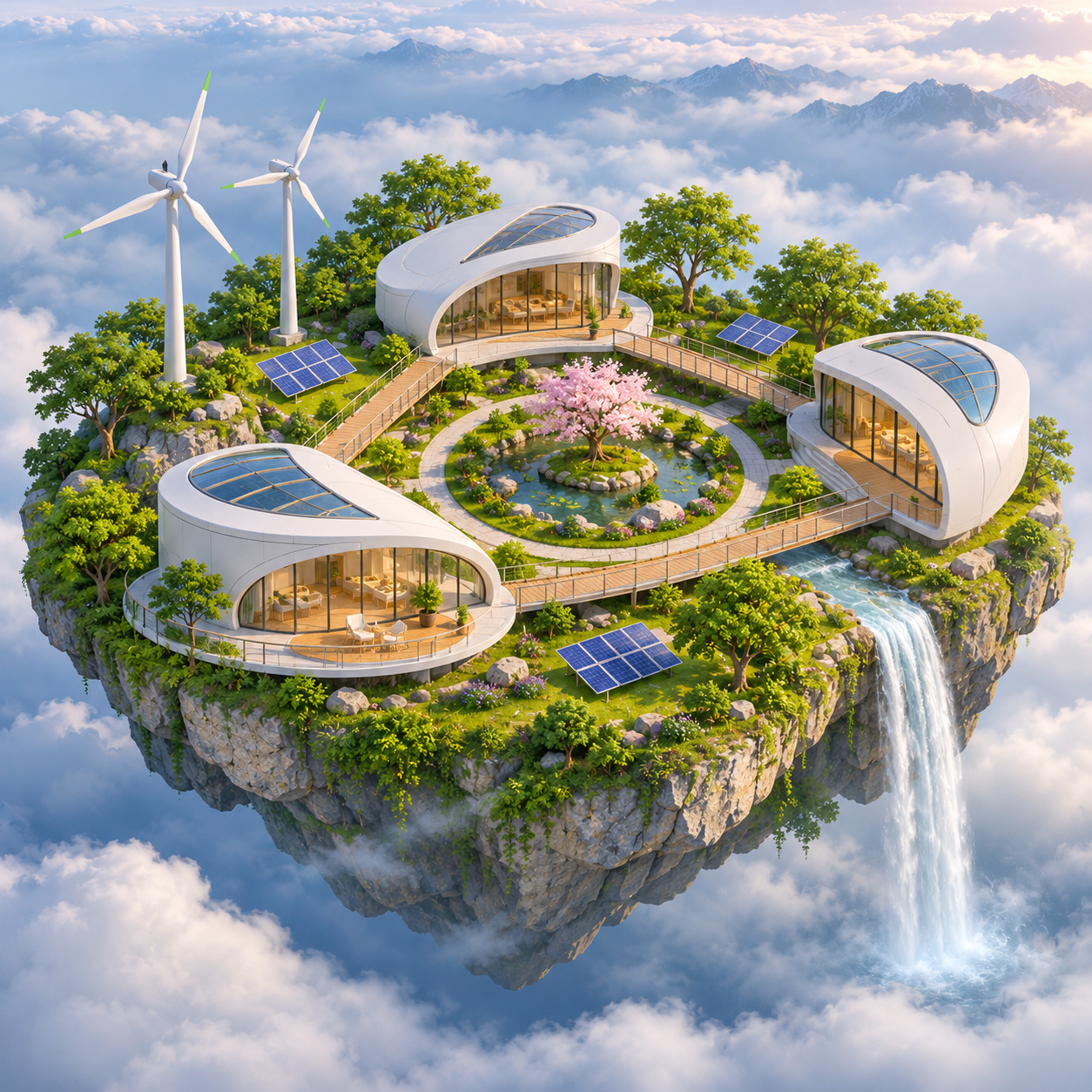
GPT Image 2.6 also generated three modern white buildings and two wind turbines.
The circular garden was clearly visible in the center, surrounded by landscaping, solar panels, and trees.
A waterfall flowed from the right edge of the island.
The most important difference was the bridge system.
GPT Image 2.6 created visible walkway connections between the buildings, making the intended relationship easier to understand.
However, the model interpreted the narrow wooden bridge as a broader walkway network rather than one simple bridge.
It also added background mountains and decorative landscaping not explicitly required by the prompt.
Prompt Adherence Checklist
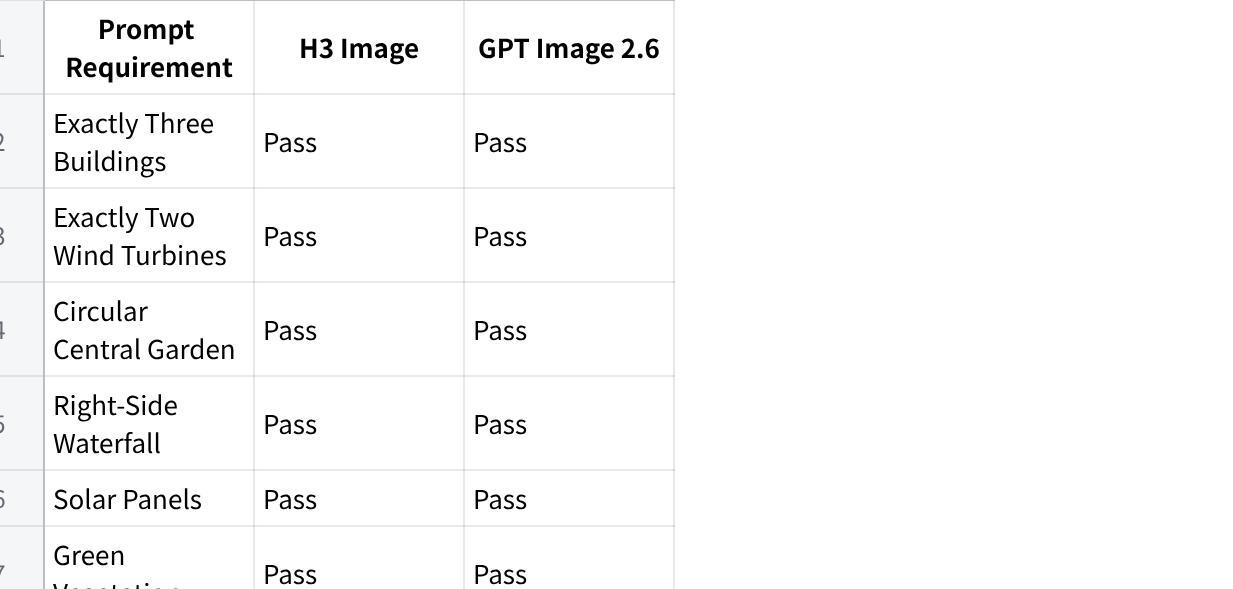
| Prompt Requirement | H3 Image | GPT Image 2.6 |
|---|---|---|
| Exactly Three Buildings | Pass | Pass |
| Exactly Two Wind Turbines | Pass | Pass |
| Circular Central Garden | Pass | Pass |
| Right-Side Waterfall | Pass | Pass |
| Solar Panels | Pass | Pass |
| Green Vegetation | Pass | Pass |
| Bridge Connecting Buildings | Partial | Closer to requested layout |
| Strict Isometric Projection | Partial | Partial |
| No Additional Buildings | Pass | Pass |
点击图片可查看完整电子表格
Winner: GPT Image 2.6
Both models accurately followed the major object-count requirements.
However, GPT Image 2.6 represented the bridge connections between buildings more clearly.
H3 Image created a coherent island scene, but its walkway did not fully express the requested building-to-building relationship.
GPT Image 2.6 wins this test for spatial relationship accuracy.
Neither model perfectly followed every aspect of the prompt, particularly the strict isometric perspective and bridge specification.
Test 3: Text Rendering — Astronomy Poster
Text rendering is an important capability for AI-generated marketing materials, educational graphics, posters, and presentations.
For this test, we requested an astronomy poster containing exact English text, four labeled planets, and a specific layout.
We also checked whether the visual representation of each planet matched its label.
The Prompt
Design a premium educational astronomy poster with a dark navy background and elegant cream-colored typography. At the top, display the exact title "EXPLORE OUR SOLAR SYSTEM". Below it, arrange four illustrated planets in a clean horizontal row, in this exact order from left to right: Mercury, Venus, Earth, and Mars. Place each planet's correct English name directly underneath its illustration. At the bottom, include the exact sentence "Four worlds, endless discoveries." Use balanced spacing, readable typography, accurate spelling, refined scientific illustration, and a modern museum-poster aesthetic. Do not add extra words, planets, or logos.
H3 Image vs GPT Image 2.6 Results
H3 Image Results
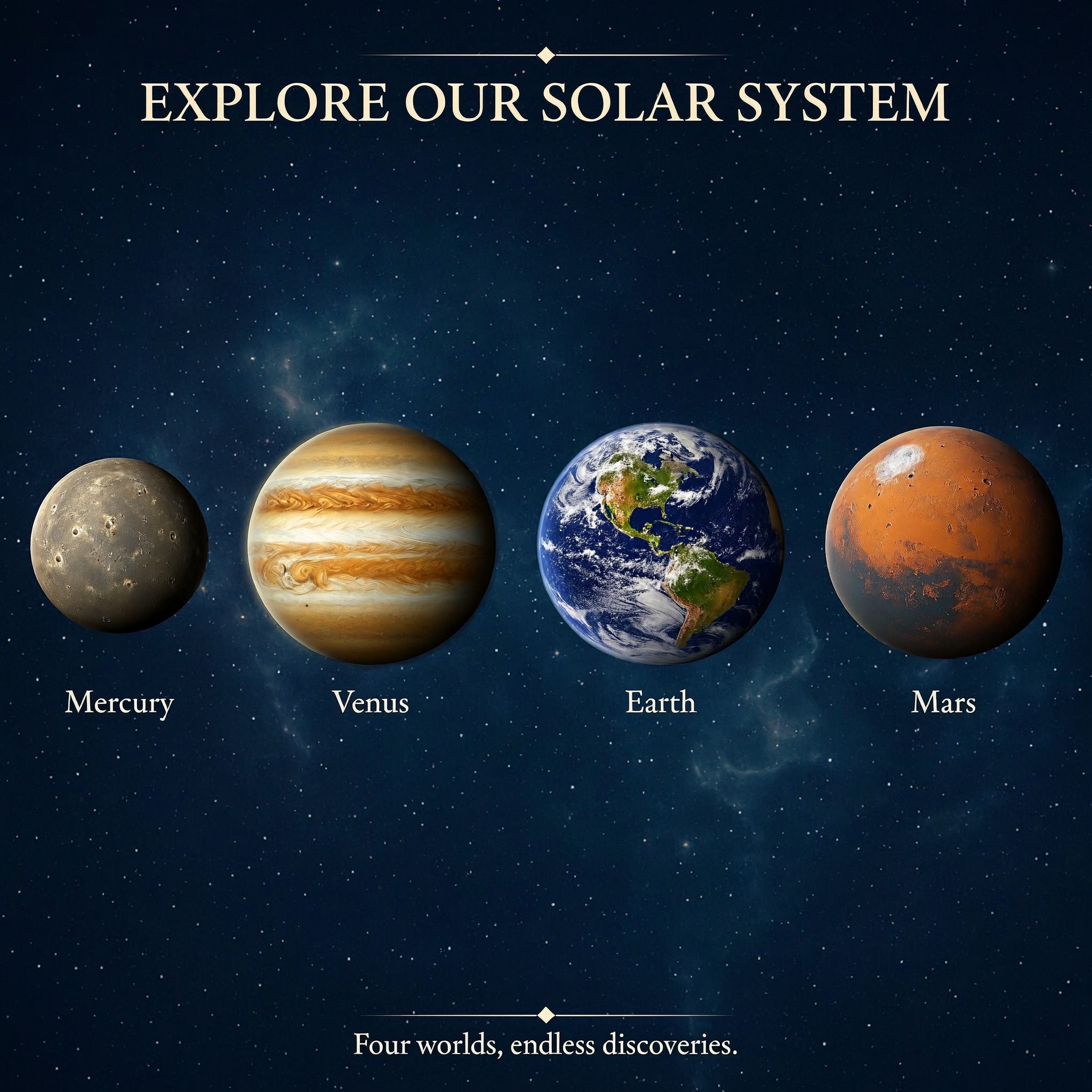
H3 Image correctly generated the headline:
EXPLORE OUR SOLAR SYSTEM
All four planet names appeared in the requested order:
Mercury, Venus, Earth, and Mars.
The closing sentence, "Four worlds, endless discoveries.", was also reproduced correctly.
The poster used a dark navy background, elegant cream-colored typography, and a balanced horizontal arrangement.
However, one important visual error appeared.
The planet labeled Venus had prominent horizontal bands resembling Jupiter rather than the expected appearance of Venus.
This demonstrates that correct text rendering does not guarantee accurate visual representation.
GPT Image 2.6 Results
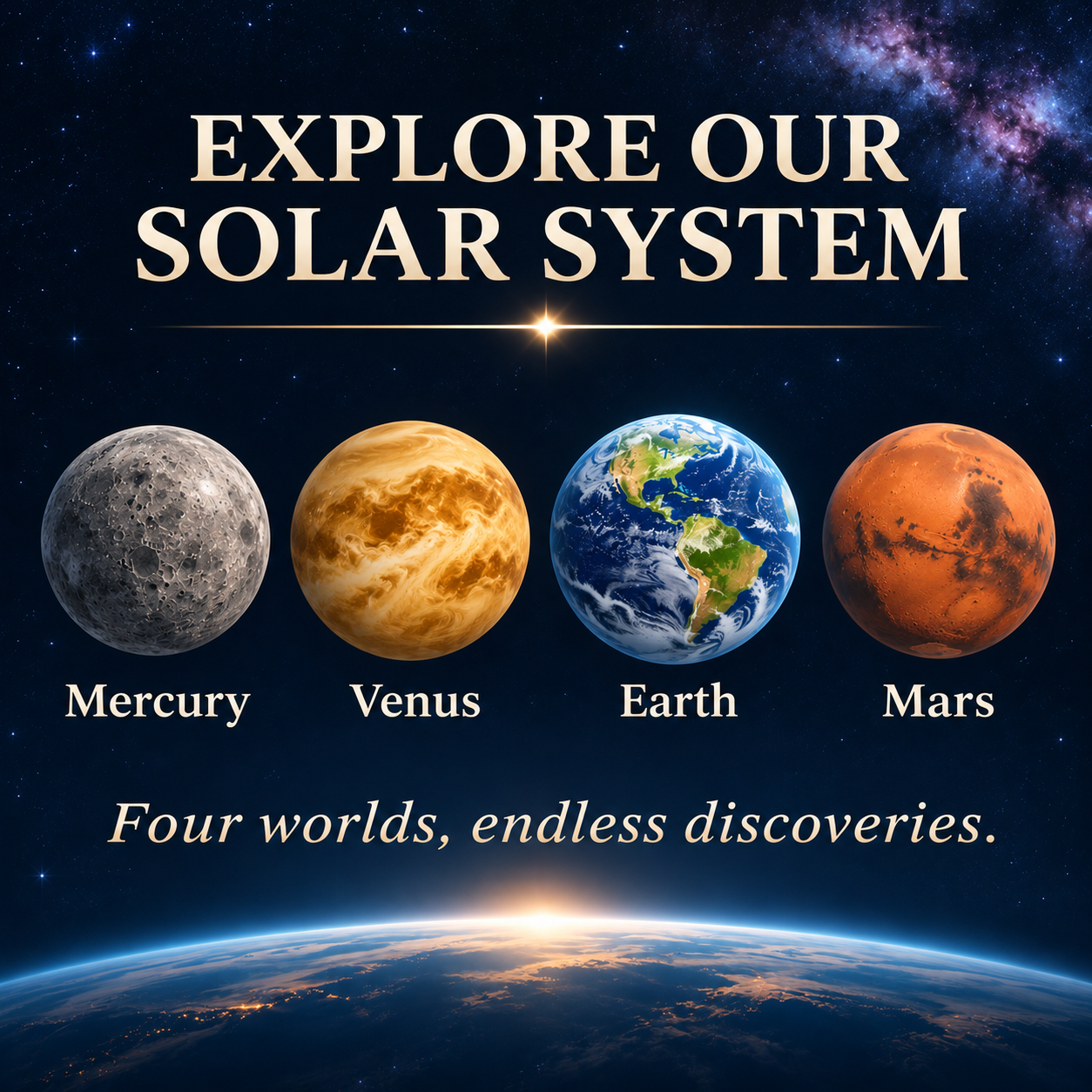
GPT Image 2.6 also reproduced all requested text correctly.
Its headline was larger and arranged across two lines, creating a stronger visual hierarchy.
The four planet labels appeared beneath the corresponding illustrations, and the closing sentence was accurate.
The most noticeable improvement was the representation of Venus.
GPT Image 2.6 generated a yellow-orange planet with cloud-like patterns that more closely resembled Venus than the striped depiction in the H3 Image output.
However, GPT Image 2.6 introduced an additional Earth-horizon illustration at the bottom of the poster.
This decorative element was not requested and added another depiction of Earth beyond the four labeled planets.
Side-by-Side Comparison
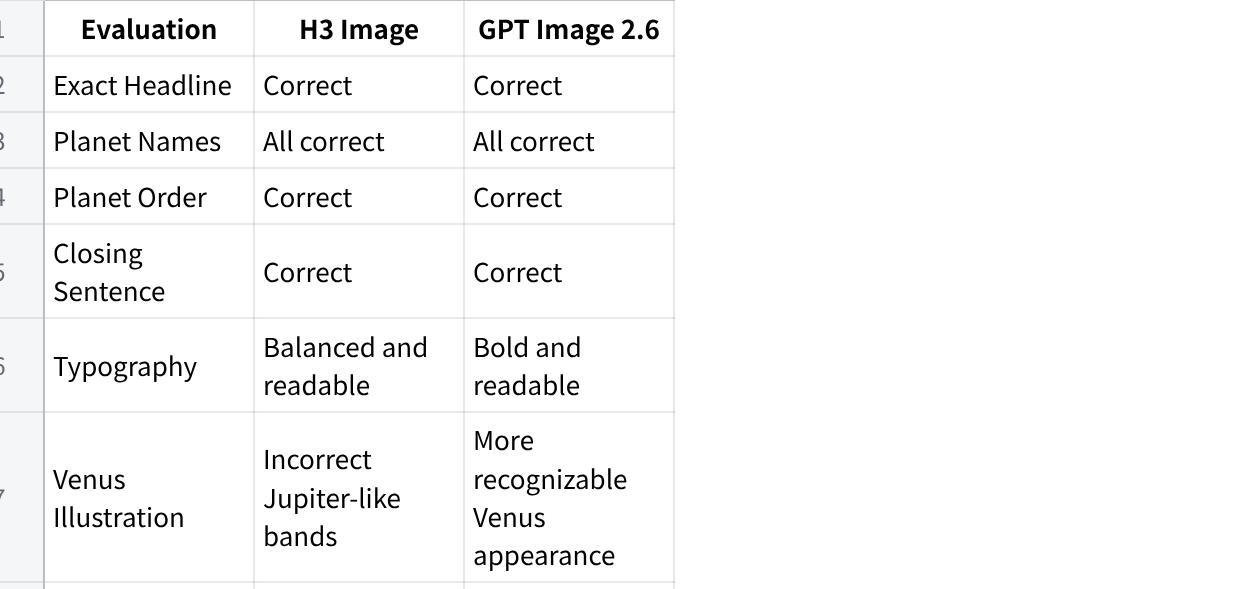
| Evaluation | H3 Image | GPT Image 2.6 |
|---|---|---|
| Exact Headline | Correct | Correct |
| Planet Names | All correct | All correct |
| Planet Order | Correct | Correct |
| Closing Sentence | Correct | Correct |
| Typography | Balanced and readable | Bold and readable |
| Venus Illustration | Incorrect Jupiter-like bands | More recognizable Venus appearance |
| Unrequested Visual Elements | No major additions | Additional Earth horizon |
点击图片可查看完整电子表格
Winner: GPT Image 2.6 for Visual Accuracy
Both models performed equally well in exact English text reproduction.
However, GPT Image 2.6 produced a more recognizable depiction of Venus, avoiding the obvious Jupiter-like appearance found in the H3 Image output.
That advantage matters for educational visuals, where factual image accuracy is just as important as correct labels.
GPT Image 2.6 was not perfect, though. Its extra Earth-horizon illustration reduced strict adherence to the requested four-planet composition.
GPT Image 2.6 wins on visual-semantic accuracy, while text rendering itself is a tie.
Overall Test Results: Which Model Performed Better?
Across the three scenarios, both models generated coherent images and followed most of the instructions.
The differences became clearer when we examined individual requirements.
H3 Image vs GPT Image 2.6 Winner Table
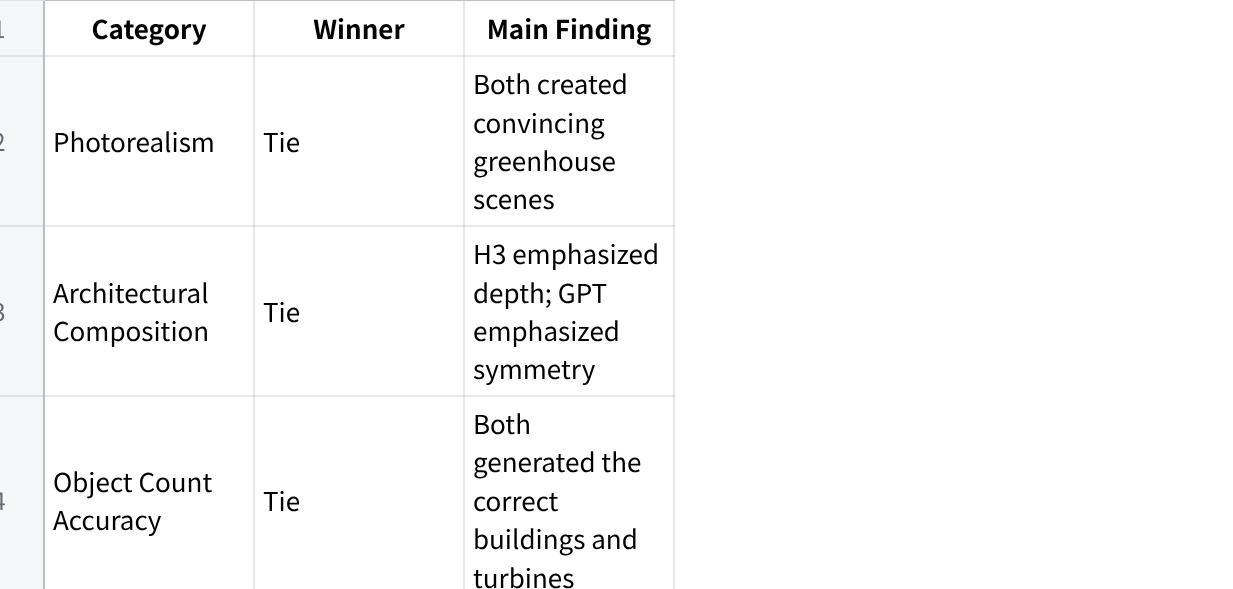
| Category | Winner | Main Finding |
|---|---|---|
| Photorealism | Tie | Both created convincing greenhouse scenes |
| Architectural Composition | Tie | H3 emphasized depth; GPT emphasized symmetry |
| Object Count Accuracy | Tie | Both generated the correct buildings and turbines |
| Spatial Relationships | GPT Image 2.6 | Clearer building connections |
| English Text Rendering | Tie | Both reproduced all specified text correctly |
| Visual-Semantic Accuracy | GPT Image 2.6 | More recognizable Venus illustration |
| Overall Composition | Tie | Both produced coherent layouts |
| Overall Tested Results | GPT Image 2.6 | Narrow advantage in two specific requirements |
点击图片可查看完整电子表格
What Did We Learn?
Both models handled the main visual concepts successfully.
All six outputs included the primary subjects and environments requested in their prompts.
Exact object counts were not the main challenge.
Both models generated three buildings and two wind turbines correctly in the floating-island test.
The more difficult requirement was connecting the buildings in the intended way.
Text accuracy and visual accuracy must be evaluated separately.
Both astronomy posters contained correct English text.
However, the H3 Image poster showed an inaccurate depiction of Venus, while GPT Image 2.6 introduced an extra decorative Earth illustration.
Attractive images can still contain instruction errors.
All six images were visually appealing, but each model made different choices that affected prompt adherence.
Overall Winner: GPT Image 2.6, by a Narrow Margin
GPT Image 2.6 performed better in two specific areas: spatial relationships in the floating-island scene and planet depiction in the astronomy poster.
H3 Image remained competitive in photorealism, object-count accuracy, text rendering, and overall composition.
This does not establish a winner for resolution, editing consistency, speed, or cost.
Those categories require additional controlled testing.
Image Editing and Reference Control
Generating a new image is only part of a creative workflow.
Many designers also need to edit existing images, preserve visual elements, and combine multiple references.
H3 Image: Multi-Reference Creation
MiniMax H3 Image supports up to 16 reference images.
This can be useful when a project requires multiple visual inputs, such as a product reference, a background, a material sample, and a style guide.
The H3 Image AI interface includes an Image to Image mode alongside Text to Image.
Potential use cases include product concept development, style-guided image creation, and reference-based compositions.
However, our three original tests used Text to Image only.
We did not independently measure reference fidelity, editing accuracy, or multi-image consistency.
GPT Image 2.6: Iterative Editing
GPT Image 2.6 offers editing-oriented capabilities, including markup-guided modifications in supported workflows.
This can help users indicate which parts of an existing image should change.
Such workflows are relevant to marketing graphics, product imagery, and designs that require repeated adjustments.
However, these editing capabilities were not evaluated in our three image-generation tests.
Which Is Better for Editing?
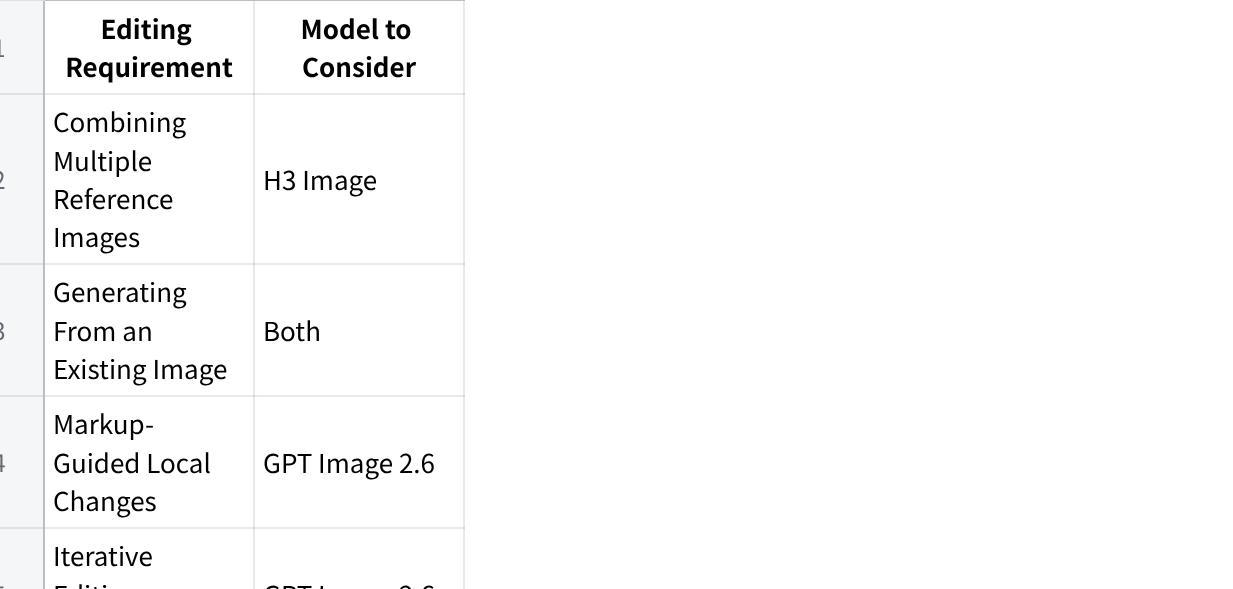
| Editing Requirement | Model to Consider |
|---|---|
| Combining Multiple Reference Images | H3 Image |
| Generating From an Existing Image | Both |
| Markup-Guided Local Changes | GPT Image 2.6 |
| Iterative Editing Workflows | GPT Image 2.6 |
| Precise Subject Preservation | Additional testing needed |
点击图片可查看完整电子表格
The key distinction is between supplying multiple references for generation and controlling changes to an existing image.
These are different capabilities and should not be treated as interchangeable.
Resolution: Does H3 Image Have an Advantage?
Resolution is one of H3 Image's most notable advertised features.
MiniMax H3 Image supports native output of approximately 16 megapixels, including square images around 4096 × 4096 pixels.
This can be useful for detailed digital artwork, high-resolution illustrations, and images that may require cropping.
However, resolution and image quality are not the same thing.
A larger image can still contain inaccurate geometry, incorrect objects, or visual artifacts.
Our H3 Image tests used the 2K setting.
The exact GPT Image 2.6 resolution setting was not recorded.
Therefore, we cannot use these six images to establish a controlled resolution winner.
Verdict: H3 Image offers a documented native high-resolution capability, but this comparison does not prove superior detail quality at matched output sizes.
Generation Speed: Which Model Is Faster?
Generation speed matters when creators need to produce multiple variations or work under tight deadlines.
Both model families have been promoted for efficient image generation, but vendor speed claims may use different hardware, resolutions, and quality settings.
In our tests, generation times were not recorded for either model.
As a result, we cannot declare a speed winner.
A meaningful speed comparison would require the same prompts, documented output settings, repeated runs, and a consistent timing method.
It would also help to measure how many generations or edits are required to reach a usable final image.
Pricing: H3 Image vs GPT Image 2.6
Price is another important consideration, especially for users generating images frequently.
However, the two platforms may use different billing systems.
H3 Image: Actual Test Credits
Our three H3 Image tests used the 2K setting.
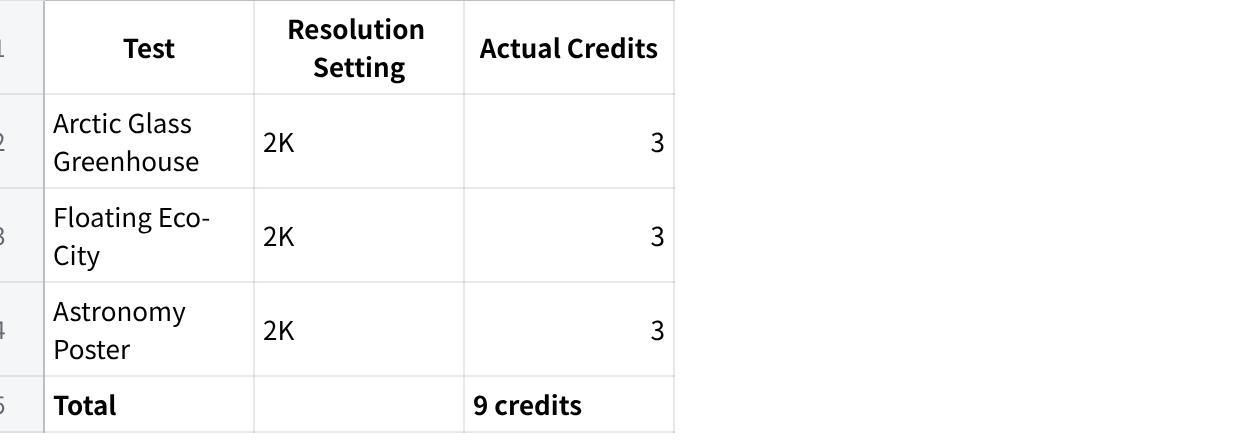
| Test | Resolution Setting | Actual Credits |
|---|---|---|
| Arctic Glass Greenhouse | 2K | 3 |
| Floating Eco-City | 2K | 3 |
| Astronomy Poster | 2K | 3 |
| Total | 9 credits |
点击图片可查看完整电子表格
Each generation consumed 3 credits.
These are actual observed charges for our test runs, not a guarantee that all resolutions or workflows cost the same.
The H3 Image AI Generator displays an estimated credit cost before generation.
GPT Image 2.6: Test Cost Not Recorded
The actual cost of our three GPT Image 2.6 generations was not recorded.
Depending on the access method, GPT Image 2.6 usage may be billed through API usage or a platform-specific pricing arrangement.
Without a verified cost for these three outputs, we cannot calculate a reliable per-image price comparison.
Which Model Is Cheaper?
Our testing confirms that H3 Image consumed 9 credits for three images.
It does not establish that H3 Image is cheaper than GPT Image 2.6 in monetary terms.
For production work, the more useful metric is often the cost of obtaining one acceptable final image, including retries and edits.
H3 Image vs GPT Image 2.6: Pros and Cons
MiniMax H3 Image
Pros
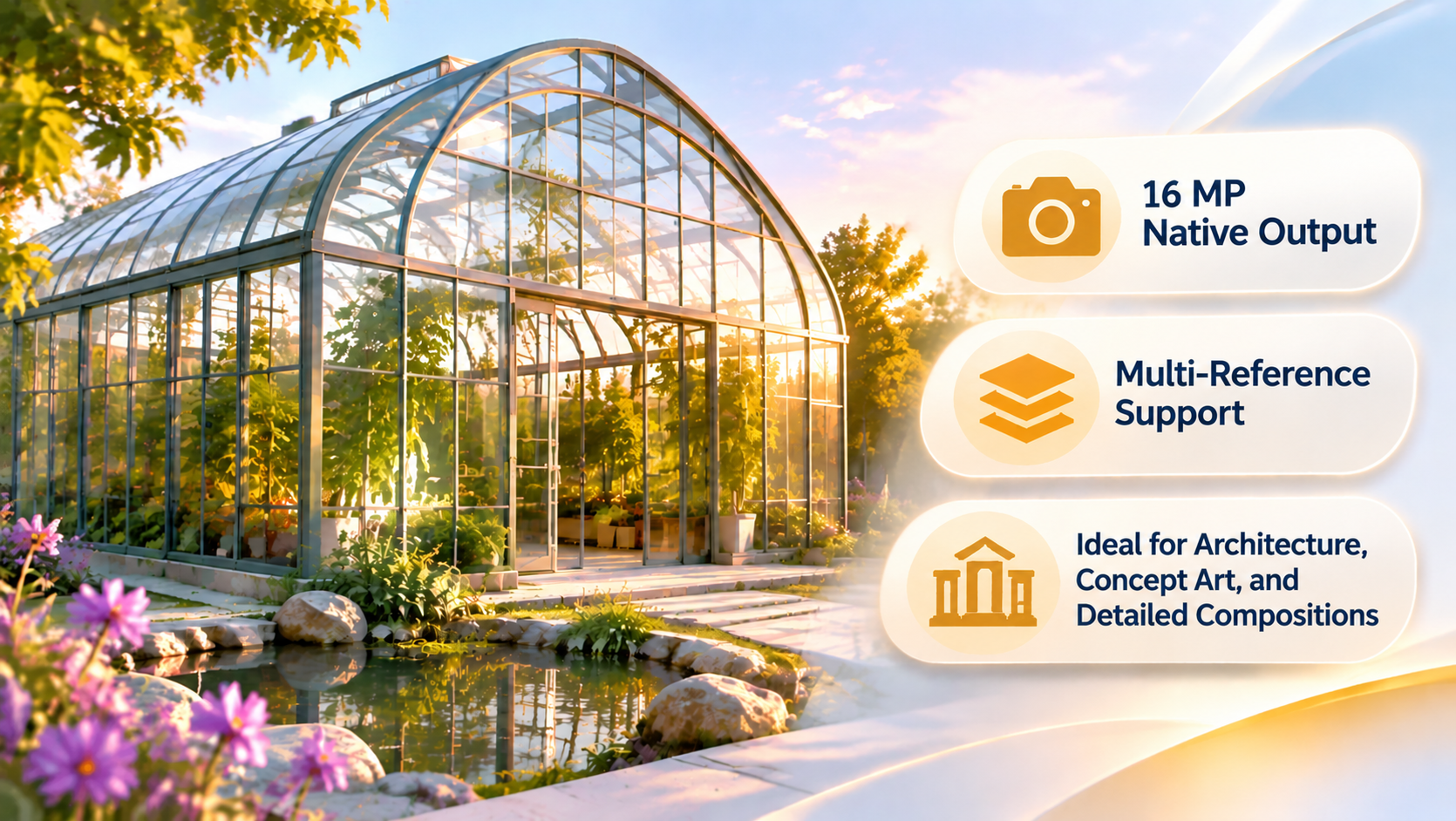
Documented native high-resolution output
Supports up to 16 reference images
Text to Image and Image to Image workflows
Strong architectural depth in our greenhouse test
Accurate object counts in our floating-island test
Correct English text in our astronomy poster
Visible credit estimates in the tested interface
Cons
Bridge connections were less accurate in our complex-scene test
The astronomy poster contained a factual visual error
Some glass reflections were difficult to interpret
Our tests did not evaluate 4K output or image editing
No recorded generation-speed benchmark
GPT Image 2.6
Pros
Clearer spatial connections in our floating-island test
More recognizable Venus illustration
Correct English text in our poster test
Strong symmetrical architectural composition
Editing-oriented workflows
Additional output options in supported environments
Cons
Added an unrequested Earth-horizon illustration
Did not perfectly follow the strict isometric requirement
Exact resolution setting was not recorded
Actual generation cost was not recorded
Editing and additional output capabilities were not independently tested here
Which AI Image Generator Should You Choose?
The best model depends on what you need to create.
Choose H3 Image for High-Resolution Still Images
If your priority is creating detailed still images, H3 Image is worth considering.
Its documented native 16MP capability and multi-reference support make it relevant to architectural illustrations, concept art, and visually detailed compositions.
Our greenhouse test also demonstrated convincing lighting and architectural depth.
You can explore the model through H3 Image AI.
Choose GPT Image 2.6 for Editing-Oriented Workflows
If you frequently revise images or need to control specific changes, GPT Image 2.6 may offer a more suitable workflow.
Its editing capabilities and additional supported output formats can be useful for creative iteration.
In our tests, it also handled certain spatial and visual-accuracy requirements more successfully.
For Marketing Posters, Test Both
Both models reproduced the exact English text in our astronomy poster prompt.
That is encouraging for marketing and educational graphics.
However, the outputs also demonstrated why visual proofreading matters.
H3 Image generated an incorrect depiction of Venus, while GPT Image 2.6 added an unrequested visual element.
For published materials, always review spelling, labels, factual details, and layout.
For Complex Scenes, Check Spatial Relationships
Both models handled the exact building and wind-turbine counts.
But they differed in how they represented connections between buildings.
If a prompt includes precise positions, relationships, or object interactions, evaluate those requirements individually rather than relying on overall image quality.
Final Verdict: Is H3 Image Better Than GPT Image 2.6?
After generating six original images using three identical prompts, we found that both models were capable of producing detailed, visually coherent results.
H3 Image performed well in architectural lighting, object-count accuracy, and English text rendering.
GPT Image 2.6 matched those strengths while producing clearer building connections in the floating-island test and a more recognizable depiction of Venus in the astronomy poster.
GPT Image 2.6 was the narrow overall winner in our three tested scenarios.
However, this result should not be interpreted as proof that GPT Image 2.6 is better in every image-generation task.
H3 Image remains a compelling option for high-resolution still-image generation and multi-reference workflows.
GPT Image 2.6 may be more suitable for users who prioritize iterative editing or need additional output formats.
Because our tests did not record comparable resolution settings, generation times, or monetary costs, those categories remain unresolved.
Our recommendation: Choose based on the requirements of your actual project. If you want to explore high-resolution AI image creation in a dedicated browser-based workspace, try H3 Image AI.
Frequently Asked Questions
Is H3 Image better than GPT Image 2.6?
Not in every category. In our three original tests, GPT Image 2.6 showed a narrow advantage in spatial relationships and visual-semantic accuracy. H3 Image remained competitive in photorealism, object-count accuracy, and text rendering.
Can H3 Image generate 4K images?
H3 Image advertises native output of approximately 16 megapixels, including 4096 × 4096 images. Our original tests used the 2K setting, so we did not independently evaluate its maximum-resolution output.
How many reference images does H3 Image support?
MiniMax H3 Image advertises support for up to 16 reference images. The exact workflow may depend on the platform interface.
Can H3 Image edit existing pictures?
Yes. H3 Image AI provides an Image to Image mode. However, our three tests used Text to Image, so we did not independently evaluate editing accuracy.
Where can I try MiniMax H3 Image?
You can access the online generator at H3 Image AI, where the interface provides Text to Image and Image to Image workflows.